Last updated: June 24, 2026
Available with any of the following subscriptions, except where noted:

-
 Additional subscriptions required for certain features
Subscription required A Starter, Professional, or Enterprise subscription is required to use HubSpot payments. Stripe payment processing is available for all subscriptions, and available internationally with some exceptions.
Permissions required Super Admin permissions are required to view, apply for, and manage HubSpot Capital financing.
If you use HubSpot payments or Stripe as a payment processing option, you may be eligible for capital financing using HubSpot Capital, powered by Stripe.
HubSpot Capital allows eligible businesses to access financing based on payment processing history. Eligible accounts are pre-qualified based on transaction history. If approved, funding is transferred within two business days.
For questions about the Stripe Capital financing program, contact Stripe Capital.
Before you get started
Understand requirements
- To access HubSpot Capital financing, your business must be based in the United States or United Kingdom.
- Your HubSpot account must be enrolled in HubSpot payments or Stripe as a payment processing option.
- A business representative with at least 25% ownership must submit the capital financing application.
Understand limitations and considerations
- Financing offers will only display for eligible accounts.
- Financing offers use a fixed fee. Payments are automatically deducted from future payments.
- After receiving the financing, a minimum amount is due for each payment period. If payments collected through sales don’t meet the minimum required amount for the period, your account will be automatically debited for the remaining amount at the end of the period. You can also make manual payments against the financing.
- If your financing agreement includes a fixed payment amount, deductions stop after the amount is met. The payment terms for your offer are displayed during the application process. Make sure to carefully review the terms before applying.
- HubSpot Capital, powered by Stripe, offers financing types that include loans and merchant cash advances. All financing applications are subject to review prior to approval.
- In the U.S., loans are issued by Celtic Bank.
- Merchant cash advances are provided by YouLend through Stripe Capital. Learn more about reviewing your offer terms.
Apply for financing
- In your HubSpot account, click the
settings icon in the top navigation bar. - In the left sidebar menu, navigate to Payments Account.
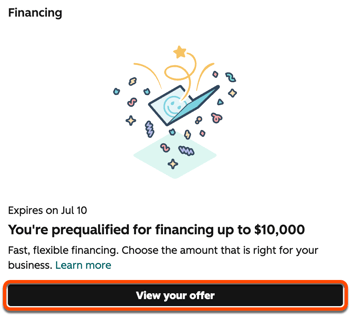
- In the Financing section, click View your offer. If there isn't an offer to view, your account isn't currently eligible for HubSpot Capital financing.
- In the right panel:
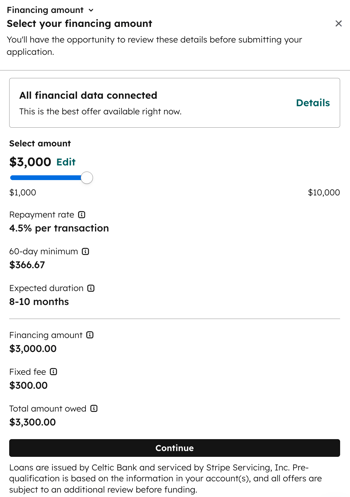
- Click Connect to connect your bank account and share your business credit history. The information will be used to determine if you're eligible for an increased offer or reduced fees. Once you've connected your financial data, click Details to view more information about the offer.
- Select the amount using the slider or click Edit and enter the amount.
- Click Continue.
- Verify your business information, then enter your identification details.
- If approved, funds are transferred to your connected bank account within two business days.
Manage capital financing
If your financing application is approved, view your financing status in your HubSpot account:
- In your HubSpot account, click the
settings icon in the top navigation bar. - In the left sidebar menu, navigate to Payments Account.
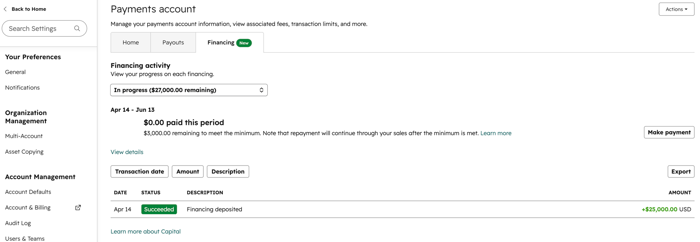
- At the top, click the Financing tab.
- Click the Financing activity dropdown menu to view your financing progress.
- Click Make payment to submit a payment. In the right panel:
- Click the amount dropdown menu and select the financing to make a payment against.
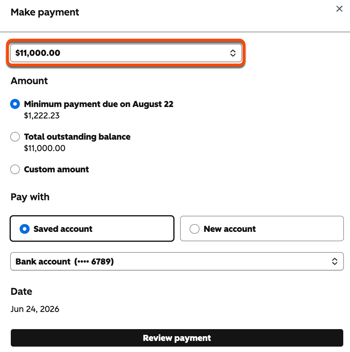
- Select Minimum payment to pay the minimum amount due.
- Select Total outstanding balance to pay the total amount due.
- Select Custom amount and enter an amount to pay.
- Under Pay with, select Saved account to pay from an existing bank account. Click the dropdown menu and select an existing bank account. Select New account and enter the bank account details to pay using a different bank account.
- Click Review payment. Click Confirm payment to process the payment.
- Click the amount dropdown menu and select the financing to make a payment against.
- Review transaction details in the table. Click Export to export the transaction details.