跳到内容
请注意::本文仅为方便您阅读而提供。本文由翻译软件自动翻译,可能未经校对。本文的英文版应被视为官方版本,您可在此找到最新信息。您可以在此处访问。

创建博客

上次更新时间: 2025年12月1日

可与以下任何订阅一起使用,除非另有说明:

创建一个或多个博客,为内容策略组织和发布内容。为每个博客设置博客名称、语言和 URL,并调整设置。

请注意:您可创建的博客数量取决于您的HubSpot 订阅

需要权限 创建博客需要编辑网站设置权限。

  1. 在 HubSpot 帐户中,单击顶部导航栏中的 settings“设置”图标
  2. 在左侧边栏菜单中,导航至内容>博客
  3. 在 "当前视图"部分,单击第一个 下拉菜单并选择 "创建新博客"。在使用品牌附加组件的账户中,这将是第二个下拉菜单。
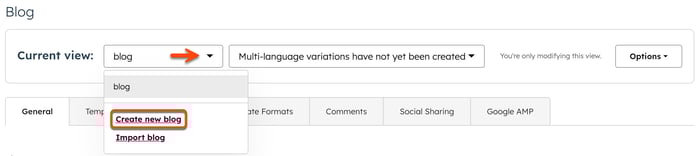
The blog settings page is displayed. An arrow points to the Current view dropdown menu. In the menu, a box is placed around the Create new blog hyperlinked text.

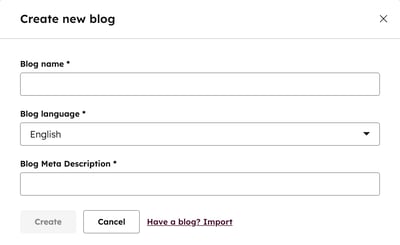
  1. 在对话框中,在博客名称字段中输入文本
  2. 点击博客语言下拉菜单,选择一种语言
  3. 在 "博客元描述"字段中,输入博客描述

The blog settings page is displayed with a dialog box visible for creating a new blog. Three fields are present in the dialog box including Blog name, Blog language, and Blog Meta Description.

  1. 完成后,单击创建。您将进入博客设置页面的常规选项卡。在 "常规"选项卡上,您可以继续自定义博客设置
  2. 创建博客后,您可以创建并发布博文
这篇文章有帮助吗?
此表单仅供记载反馈。了解如何获取 HubSpot 帮助