
Last updated: April 16, 2026
Available with any of the following subscriptions, except where noted:
-
 Marketing Hub
Professional, Enterprise
Marketing Hub
Professional, Enterprise
After creating your campaign in Marketing Studio, you can access and review your individual campaign performance from your campaign details page. You can also review the performance of individual campaign assets such as forms or marketing emails from directly within Marketing Studio.
Review the performance of your campaign
After creating your campaign with Marketing Studio, to review your campaign performance:
- In your HubSpot account, navigate to Marketing > Marketing Studio.
- At the top, click the Manage tab. In the table, select an existing campaign. Alternatively, create a new campaign.
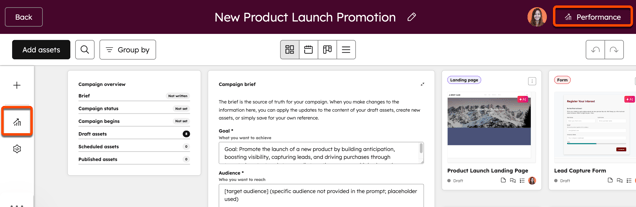
- In the top right, click Performance. Alternatively, click the Performance icon in the left sidebar menu.
- You’ll be automatically redirected to the campaign performance page. Learn more about analyzing your campaigns.
- When reviewing assets in your performance page, published assets will appear in the assets section of the performance page.
- Campaign assets that have not been published yet, such as draft social posts, draft emails, etc, will not appear.
Please note: to access your overall campaign analytics, use the global search bar to search for campaign analytics.
Review the performance of individual assets in Marketing Studio
After creating your campaign with Marketing Studio, to review your campaign performance:
- In your HubSpot account, navigate to Marketing > Marketing Studio.
- At the top, click Manage.
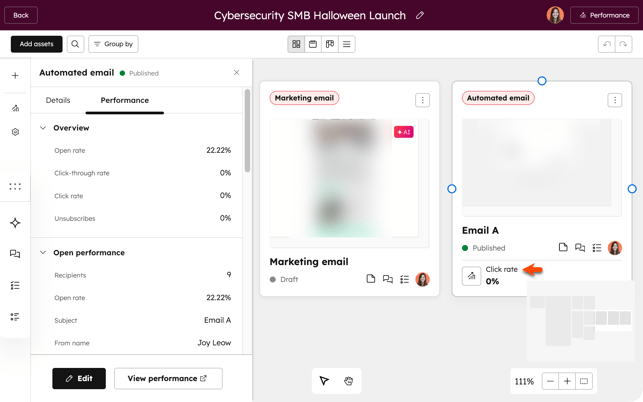
- Click the name of the campaign that you’d like to review. In the Canvas view, key metrics will appear on published assets.
- To view the performance metrics for the asset:
- Click the asset card.
- In the left panel, click the Performance tab. Metrics for the specific assets will appear.
