Last updated: March 23, 2026
Available with any of the following subscriptions, except where noted:
-
 Marketing Hub
Professional, Enterprise
Marketing Hub
Professional, Enterprise
-
 Content Hub
Professional, Enterprise
Content Hub
Professional, Enterprise
Generate calls-to-action (CTAs) using AI. Enter a description for your CTA, and Breeze will generate content suggestions, including copy, images, and more.
Please note: you can manage AI feature access in your AI settings and configure what data is shared. Review HubSpot's AI Trust FAQs and AI Model Cards for detailed information on AI security controls, data use, and compliance.
- In your HubSpot account, navigate to Marketing > CTAs.
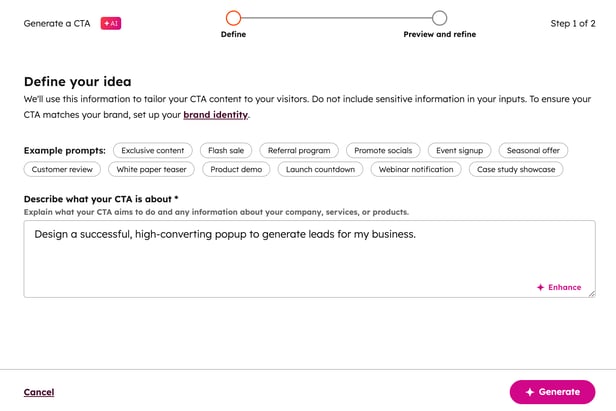
- In the top right, click Create with AI.
- In the Describe what your CTA is about field, enter a detailed description for your CTA. Alternatively, select an example prompt.
- To refine your prompt, click Enhance.
- In the bottom right, click Generate.
- This can take up to 2 minutes.
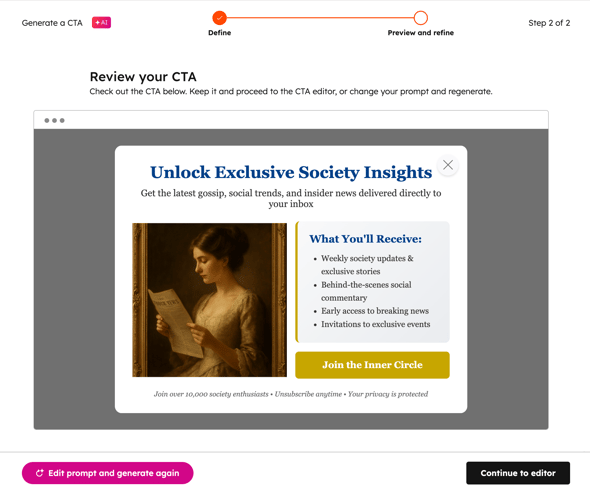
- You'll be directed to a preview of your AI-generated CTA.
- To re-generate another CTA, in the bottom left, click Edit prompt and generate.
- To re-generate another CTA, in the bottom left, click Continue to editor. Then, continue setting up your CTA.