Last updated: August 3, 2026
Available with any of the following subscriptions, except where noted:
-
 Marketing Hub
Professional, Enterprise
Marketing Hub
Professional, Enterprise
-
 Sales Hub
Professional, Enterprise
Sales Hub
Professional, Enterprise
-
 Service Hub
Professional, Enterprise
Service Hub
Professional, Enterprise
-
 Data Hub
Professional, Enterprise
Data Hub
Professional, Enterprise
-
 Smart CRM
Professional, Enterprise
Smart CRM
Professional, Enterprise
-
 Revenue Hub
Professional, Enterprise
Revenue Hub
Professional, Enterprise
-
 HubSpot Credits required
Use the Infer company value proposition and ICP workflow action to use HubSpot's AI to create selling profiles for prospecting agent, including target personas, value propositions, and more. Then, you can enroll contacts to the agent in this segment with the selling profile to help the agent send personalized outreach.
Please note: you can manage AI feature access in your AI settings and configure what data is shared. Review HubSpot's AI Trust FAQs and AI Model Cards for detailed information on AI security controls, data use, and compliance.
Before you get started
Permissions required Super Admin or Workflows permissions are required to create and edit workflows.
Before using the Infer company value proposition and ICP workflow action to analyze your records' data, please note the following:
- The Give users access to generative AI tools and features and CRM data settings must be turned on. Learn more about managing your AI settings.
- The Infer company value proposition and ICP action has a limit of 3,000 executions per month, which resets at the start of each month. If you've reached the execution limit, the action will fail until the limit resets. During the beta, this limit is subject to change.
Use the Infer company value proposition and ICP workflow action
Use this action to generate a selling profile based on a company's domain name and scraped text from the company's website.- In your HubSpot account, click More, then navigate to Automation > Workflows. If More doesn't appear in your account, navigate to Automation > Workflows directly.
- Click the name of an existing workflow or create a new workflow.
- Set your enrollment triggers.
- Click the + plus icon to add an action.
- In the left panel, click to expand the AI section. Then, click Infer company value proposition and ICP.
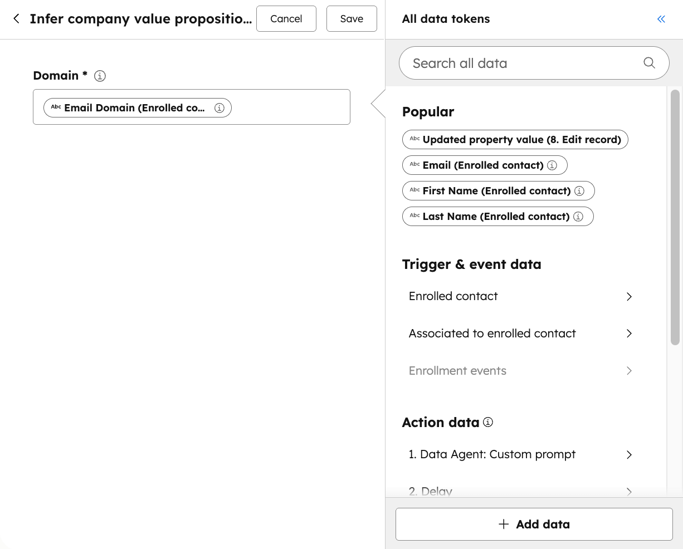
- In the Domain field, enter the domain for the company's website. Or, select a property from the data panel token to set as the company domain.
- At the top, click Save.
 .
.
Use outputs with other workflow actions
After adding the Infer company value proposition and ICP action to your workflow, you can use the generated output in other workflow actions where the data panel is used.
- After setting up your action, in the same workflow, click the + plus icon to add an action.
- Select a workflow action.
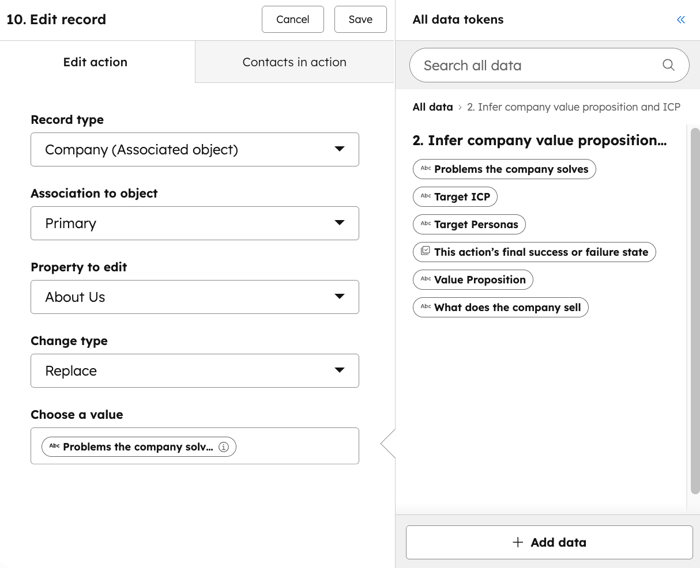
- In the panel, under the Action data section, select the Infer company value proposition and ICP action. Then, select from the available data options. For example, you can select the Problems the company solves, or What does the company sell options.
- Continue setting up your workflow action.