Last updated: March 3, 2026
Available with any of the following subscriptions, except where noted:

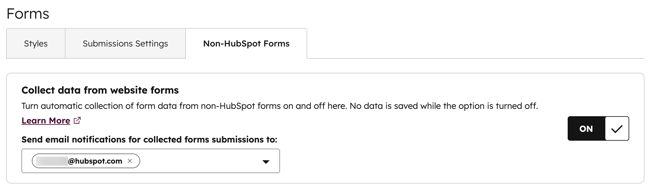
To receive an email notification when a visitor submits a non-HubSpot form, you can turn on email notifications in your non-HubSpot forms settings.
Please note: email notifications for non-HubSpot forms are set for the account, not individual forms. Turning on email notifications for non-HubSpot forms will trigger notifications for all non-HubSpot forms submitted.
- In your HubSpot account, click the settings icon in the top navigation bar.
- In the left sidebar menu, navigate to Marketing > Forms.
- Click the Non-HubSpot Forms tab.
- Click the Send email notifications for collected forms submissions to dropdown menu and select the emails addresses to receive notifications when non-HubSpot forms are submitted. Notification recipients must be active users in your HubSpot account.
- In the bottom left, click Save.