
Last updated: May 13, 2026
Available with any of the following subscriptions, except where noted:

When you select recipients for a marketing email, you can exclude specific contacts or segments from receiving the email. This can be helpful for ensuring that marketing emails only reach contacts who will benefit from receiving them.
This article covers excluding contacts and segments by selecting them in the Don't send to menu. Learn more about excluding unengaged contacts.
Understand limitations and considerations
- The instructions below only apply to regular marketing emails. If you're creating an automated email, its recipients will be based on the associated workflow's enrollment criteria. If you're creating a blog/RSS email, the recipients will be selected automatically based on your blog subscribers.
- If you've added a contact individually to the Send to dropdown menu, they will receive the email even if they're present on a segment in the Don't send to dropdown menu.
Exclude marketing email recipients
- In your HubSpot account, navigate to Marketing > Email.
- Click the name of a drafted email or click Create email.
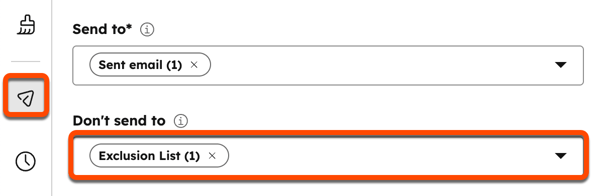
- In the email editor, click the send icon in the left sidebar.
- Click the Don't send to dropdown menu and select the checkbox next to each segment or contact you want to exclude from receiving the email.
- When you're finished editing the email, click Review and send in the top right.
- Review the contacts and segments you aren't sending this email to, then click Send.
