
Last updated: August 4, 2026
Available with any of the following subscriptions, except where noted:
-
 Content Hub
Professional, Enterprise
Content Hub
Professional, Enterprise
Translate pages and blog posts into multiple languages using HubSpot's AI, powered by DeepL. Creating content in additional languages allows you to reach more customers who may not be fluent in your content's original language.
Please note: you can manage AI feature access in your AI settings and configure what data is shared. Review HubSpot's AI Trust FAQs and AI Model Cards for detailed information on AI security controls, data use, and compliance.
Before you get started
Before using automatic translations, review these requirements and considerations.
Understand requirements
- To use automatic translation, a Super Admin must toggle the Give users access to generative AI tools and features switch on in AI Settings.
Understand limitations & considerations
- Automatic translation isn't available for custom blog or page modules.
Generate content translations
Generate translated versions of existing pages or blog posts as a new language variation, then review and publish.
Permissions required Marketing Access with Edit and Publish permission is required to create and publish pages in multiple languages.
-
Navigate to your content:
- Website Pages: In your HubSpot account, click More, then navigate to Content > Website Pages. If More doesn't appear in your account, navigate to Content > Website Pages directly.
- Landing Pages: In your HubSpot account, click More, then navigate to Content > Landing Pages. If More doesn't appear in your account, navigate to Content > Landing Pages directly.
- Blog: In your HubSpot account, click More, then navigate to Content > Blog. If More doesn't appear in your account, navigate to Content > Blog directly.
- Hover over a page or post, then click the Actions dropdown menu and select Create language variant.
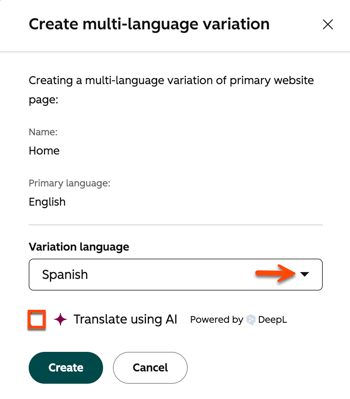
- In the dialog box, click the Variation language dropdown menu and select a language.
- Select the Translate using AI checkbox, then click Create and translate.
- In the content editor, review the translated content, then click Publish in the top right.
Understand available languages
Automatic translation is available for the following languages:
| Arabic | German | Portuguese (PT) |
| Bulgarian | Greek | Portuguese (BR) |
| Chinese (simplified) | Hungarian | Romanian |
| Czech | Indonesian | Russian |
| Danish | Italian | Slovak |
| Dutch | Japanese | Slovenian |
| English (US) | Korean | Spanish |
| English (UK) | Latvian | Swedish |
| Estonian | Lithuanian | Turkish |
| Finnish | Norwegian | Ukrainian |
| French | Polish |
