
Last updated: July 13, 2026
Available with any of the following subscriptions, except where noted:
-
 Marketing Hub
Starter, Professional, Enterprise
Marketing Hub
Starter, Professional, Enterprise
-
 Sales Hub
Starter, Professional, Enterprise
Sales Hub
Starter, Professional, Enterprise
-
 Service Hub
Starter, Professional, Enterprise
Service Hub
Starter, Professional, Enterprise
-
 Data Hub
Starter, Professional, Enterprise
Data Hub
Starter, Professional, Enterprise
-
 Content Hub
Starter, Professional, Enterprise
Content Hub
Starter, Professional, Enterprise
-
 Smart CRM
Professional, Enterprise
Smart CRM
Professional, Enterprise
Data enrichment helps keep your contact and company records accurate by adding or updating business information from HubSpot's commercial dataset, third-party providers, and publicly available information.
When you choose to use data enrichment, you submit specific contact or company records to HubSpot for enrichment. HubSpot uses a limited set of information from those records to identify matching business data and return additional properties that can help keep your CRM records complete and up to date.
For example, a sales rep imports a list of leads from a trade show. Many of the contacts only include work email addresses. The sales rep enriches those contacts in HubSpot to add available business information, such as company name, job title, industry, or company size. This gives the sales team more complete records without manually researching each contact. Later, if one of those contacts changes jobs and updated business information becomes available, continuous enrichment can update supported properties to help keep the record current.
Data enrichment is optional and is turned off by default in your HubSpot account.
When you turn on data enrichment, you control:
- When enrichment is used.
- Which records are enriched automatically.
- Whether existing records continue to be enriched.
- When enrichment is turned off.
Before you get started
Before you begin working with data enrichment, make sure you understand how enrichment works, what information is used, and how your settings affect future enrichment.
Permissions required
- Super Admin permissions are required to configure enrichment settings.
- Data enrichment access or Super Admin permissions are required to enrich records.
- Data enrichment uses business information only: first name, last name, work email, and company domain.
- When automatic or continuous enrichment is turned on, only records created after enabling enrichment and existing records that you manually select are enriched.
- Turning off enrichment stops future enrichment activity but doesn't remove information that has already been added to your CRM.
- When you use contact and company enrichment, HubSpot looks up business information to fill in your records. If HubSpot can verify the record against our commercial dataset or public and third-party sources, limited business contact data from that enrichment may also be contributed back to the commercial dataset, which helps keep records accurate across the platform. If you’re only using continuous enrichment, no data is added to HubSpot’s commercial dataset.
- Data enrichment and AI model training are separate features with separate settings that control a different use of your data within HubSpot. Turning off one will not impact or have any effect on the other. Learn more about AI model training.
How HubSpot enriches data
When you use data enrichment, HubSpot follows the steps below to find and update business information for your contact and company records.
- You select the contacts or companies in HubSpot to enrich.
- For the selected records, HubSpot uses the following identifying information to find matching information across multiple data sources.
-
-
For contact enrichment, HubSpot uses:
- First name
- Last name
- Work email address
-
For company enrichment, HubSpot uses:
- Company domain
-
- HubSpot compares this identifying information with:
-
- HubSpot's commercial dataset.
- Third-party data providers.
- Publicly available information from across the internet.
- If HubSpot finds verified business information across multiple sources, it updates the corresponding contact and company properties in your CRM. Learn more about the properties that can be enriched.
Please note: when you use data enrichment, the identifying information included in enrichment requests helps HubSpot verify existing information, identify outdated records, and improve enrichment quality over time. If HubSpot can verify the record, limited fields (first name, last name, and business email address) may be added to HubSpot's commercial dataset. Only those fields for records processed through enrichment are included. HubSpot does not use your entire CRM for enrichment.
Manage data enrichment settings
You can control how data enrichment works in your HubSpot account.
Super Admins can:
- Turn automatic enrichment on or off.
- Turn continuous enrichment on or off.
- Control how enriched data is applied to CRM properties.
Learn more about how to manage your data enrichment settings.
If you no longer want your account to use data enrichment, turn off all enrichment settings:
- In your HubSpot account, click the
settings icon in the top navigation bar. - In the left sidebar menu, in the Data Management section, click Data Enrichment.
- Toggle off all enrichment settings, including automatic enrichment and continuous enrichment, for both companies and contacts.
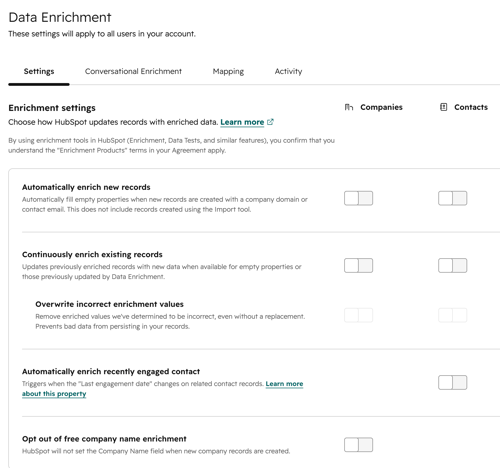
- Once your settings have been switched off, remove Data enrichment access from all users in the account.
Please note: Super Admins can continue to manually enrich individual records. To stop using data enrichment completely, turn off all data enrichment settings and ensure that Super Admins no longer manually enrich records.
Manage other related settings
Turn off data enrichment permissions for HubSpot users
If you want to keep enrichment on but you want to prevent certain users from enriching records, learn how to manage user permissions for enrichment.
Turn off AI model training
AI model training controls whether certain data can be used to improve HubSpot's AI and machine learning models that support features such as CRM deduplication, search, and the mobile business card scanner. Learn more about AI settings in your HubSpot account and how to turn off AI model training.
AI model training and enrichment are separate settings. Turning off AI model training does not turn off enrichment, and turning off enrichment does not turn off AI model training. Each setting controls a different use of your data and can be managed independently.
Understand the impact of turning off enrichment
Turning off enrichment stops HubSpot from enriching records going forward.
After enrichment is turned off:
- Existing enriched properties remain in your CRM.
- HubSpot no longer automatically fills in missing information.
- HubSpot no longer refreshes enriched properties.
- Your team must maintain record accuracy using manual updates or other data sources.
Privacy and data protection
Enrichment is off by default. It requires a customer action to turn on, either by a Super Admin manually enriching records within the companies or contacts pages, or by a Super Admin enabling automatic enrichment in settings. Until one of those steps is taken, no data flows to HubSpot's commercial dataset from your account.
Learn more about opt-out notices for HubSpot’s enrichment dataset and HubSpot’s AI Trust FAQs..
Please note: HubSpot provides tools and features to support your privacy compliance efforts, but every organization's regulatory environment is different. We recommend working with your legal counsel to determine how these tools fit into your specific compliance program.
