
Last updated: September 15, 2026
Available with any of the following subscriptions, except where noted:

-
 Seats required for certain features
-
Additional subscriptions required for certain features
Use the contracts object in HubSpot as a centralized source of truth for committed revenue. By managing contracts in HubSpot, you can record and manage existing contract agreements, manually record payments or automatically bill buyers, make updates over the duration of a contract, renew contracts, and accurately report revenue.
You can create a contract directly from a record or the contracts index page (BETA), or automatically create one when a buyer accepts a quote:
-
Directly created contracts (BETA): create or import contracts when an agreement is created outside of HubSpot, when the contract isn't reliant on an accepted quote from the buyer, or if you use another system to manage CPQ. Create contracts in HubSpot and use them as the source of truth for reporting and automation.
-
Contracts automatically created from quotes: create contracts from accepted quotes when a buyer needs to review and accept a quote before a contract is created. Manage CPQ and end-to-end revenue in HubSpot.
Learn how you can use contracts for your business, including:
-
How to use contracts in combination with other HubSpot objects such as deals, quotes, and invoices.
-
How to manage mid-contract changes and renewals.
-
How proration is managed when making contract changes.
What is a contract?
Contracts are the centralized source of truth for committed revenue in HubSpot, detailing one-time and recurring products, revenue metrics, and changes over time. Unlike deals, which track individual sales opportunities, contracts are designed to support the entire customer agreement lifecycle, including amendments and renewals.
With contracts, your teams can report on revenue metrics, set up renewals and amendments, and align revenue operations across the business. Learn more reporting on revenue.
A contract can be created created directly in HubSpot or from an accepted quote. Quotes and contracts can work together, but a quote is not required for every contract.
Contract configurations
Use the table below to identify the contract configuration suited to your needs, and the requirements in HubSpot.
| Quote required? | Automatic billing required? | Automatic payment collection required? | Configuration | Requirements |
| No | No | No | Create contracts and record payments manually. |
|
| No | Yes | No | Create contracts and automatically send invoices due on billing dates. |
|
| No | Yes | Yes | Create contracts and automatically send invoices. Automatically collect payments due. |
|
| Yes | No | No | Automatically create contracts from accepted quotes. | Revenue Hub subscription |
| Yes | Yes | No | Automatically create contracts from accepted quotes. Automatically send invoices due on billing dates. Manually collect payments. |
|
| Yes | Yes | Yes | Automatically create contracts from accepted quotes. Automatically send invoices due on billing dates. Automatically collect payments. |
|
Do HubSpot contracts replace legal contracts?
HubSpot contracts don't replace legal contracts, such as master service agreements (MSAs) or signed PDF contracts. If you need to reference a legal contract in HubSpot, you may be able to create a custom contract property with a File or URL field type and upload the document or add its URL. Before storing a legal contract in HubSpot, review the document carefully and learn more about storing Sensitive Data in HubSpot.
How is a contract created?
Subscription required A Revenue Hub subscription is required to create contracts unless you're enrolled in the Direct Create, Edit, and Renew HubSpot Contracts beta.
Seats required A Revenue Hub seat is required to create contracts unless you're enrolled in the Direct Create, Edit, and Renew HubSpot Contracts beta.
Permissions required Super Admin or Create permissions for contracts are required to create contracts.
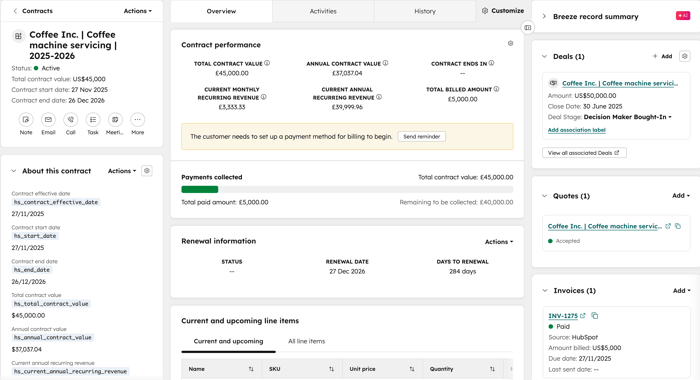
You can create a contract directly in HubSpot (BETA) or create one from an accepted quote. The contract record provides an overview of key contract details, such as contact and company information, committed revenue, and associations to other records.
Create a contract directly (BETA)
If you're a Super Admin, you can opt your account into the Direct Create, Edit, and Renew HubSpot Contracts beta.
Authorized users can create a contract from a deal, contact, company, or ticket record, or from the contracts index page. When creating the contract, users can add contract details, line items, terms, and associations directly to the contract record.
Create a contract from an accepted quote
If automatic contract creation is turned on, you can create a contract when a buyer accepts a quote. The contract reflects the agreement represented by the accepted quote.
Using contracts with the Connected CPQ, Billing, and Payments beta
Subscription required A Revenue Hub subscription is required to use the Connected CPQ, Billing, and Payments beta.
If you're enrolled in Connected CPQ, Billing, and Payments beta, you can manage the quote-to-payment process in HubSpot, from quote acceptance to invoicing and payment collection. Enroll in the beta if you want to get acceptance of a quote before a contract is created. If you don't require quote acceptance, you can directly create contracts. Learn more about the Connected CPQ, Billing, and Payments beta process.
How to use deals, quotes, contracts, and invoices together
Subscription required A Revenue Hub subscription is required to create quotes and change or renewal quotes.
Seats required A Revenue Hub seat is required to create quotes and change or renewal quotes.
You can use
-
Deals: use deals to track a sales opportunity and close it. When using contracts, it's recommended to set up different pipelines for the different types of deals. For example, a pipeline for new business, a pipeline for expansions (mid-contract changes), and a pipeline for renewals. This ensures that the different sales motions of a contract can be recorded and reported on individually.
-
Quotes: optionally create quotes based on the deal, and send to the buyer to review. If you're enrolled in the Connected CPQ, Billing, and Payments beta, and the setting to automatically create contracts is turned on, when a quote is accepted, a contract is automatically created to reflect the revenue commitment of the quote. Deals, quotes and contracts can contain both one-time and recurring line items.
- Contracts: the centralized source of truth for committed revenue. It includes the products and services the customer is paying for and any changes made to the contract. Contracts are used to manage ongoing billing, invoice creation, and payment collection. Learn more about the different ways to bill your buyers.
-
Invoices: issue invoices for payment. You can collect payments online in HubSpot or manually mark invoices as paid if using another payment method.
-
Contract changes: make updates to contracts during their lifecycle. Directly edit the contract (BETA) to update seller and buyer information, the collection process, the payment method being charged, the line items of the contract, and checkout settings. If you want to use a quote-based process for proposing and approving changes to an existing contract, learn more about creating change quotes.
- Renewal quotes: create renewal quotes as a customer nears the end of their current contract to get commitment from your customer for the next term. When a renewal quote is accepted, a new contract is created and automatically associated with the previous contract.
What information can I view on the contract record?
Use the contract to view the following details:
-
Status: view the current status of the contract.
-
Financial and revenue information: view the total contract value (TCV), annual contract value, monthly recurring revenue (MRR), and annual recurring revenue (ARR).
-
Billing details: understand the billing details including the billing contact, billed amount, billing history, and upcoming payments.
-
Renewal dates: view when the renewal of the contract is due.
-
Associations: view the records the contract is associated to including contacts, companies, deals, invoices, line items, payments, quotes, and subscriptions.
Can customers view their contracts?
The HubSpot contract object can't be viewed by your customers. They are sent quotes (if you create quotes as part of the process), invoices, receipts, and other billing-related notifications for their billing records.
What is an evergreen contract?
Evergreen contracts contain recurring line items that are set to automatically renew until canceled. Because they don't have an end date, TCV and ACV aren't calculated. MRR and ARR are still calculated.
How to edit and update contracts
Subscription required A Revenue Hub subscription is required to create change quotes.
Seats required A Revenue Hub seat is required to create change quotes.
You can edit the contract details, line items, terms, and billing and payment information from the contract record (BETA). For contracts directly created from a quote, you can create change quotes. Change quotes offer a quote-based process for proposing and approving changes to an existing contract and must be associated with a deal. It's recommended to set up pipelines (e.g., expansion pipeline) for deals associated with change to forecast and report on expansions and contractions separately.
Please note: if you're enrolled in the Connected CPQ, Billing, and Payments beta, if a credit memo has been applied to an invoice, the adjusted invoice amount won't be reflected on the contract.
How to manage renewals
Subscription required A Revenue Hub subscription is required to create renewal quotes.
Seats required A Revenue Hub seat is required to create renewal quotes.
You can renew a contract from the contract record (BETA) or by creating renewal quotes. Renewal quotes offer a quote-based process for proposing and approving renewals and must be associated with a deal. Learn more about managing the renewal process in HubSpot below.
View existing contract information
Use the contract record to view existing contract information, including performance, associated line items, billing schedule, renewal information, timeline of activities, and history. Use this information to prepare renewal conversations before sending the renewal quote.
Create a dedicated renewal pipeline
It's recommended to create a dedicated renewal pipeline for renewal deals, and to create new deals for renewal quotes. This means you can report on new business revenue vs renewal revenue, and manage renewals separately from other active deals.
What's included on a renewal
By default, the renewal uses the same term as the existing contract (e.g., if the existing contract was a 12-month agreement, the renewal quote will be configured for 12 months). The renewal includes:
- Contacts associated with the existing contract.
- The company associated with the existing contract.
- Billing contacts, if they were added to the existing contract.
- Line items of the existing contract. If the contract was updated, the renewal will also include those line items. For example, if a customer started with 10 licenses and later added 10 more, the renewal will include 20 licenses for the full term of the quote.
- Matching payment terms of the existing contract.
Use workflows to automate renewals
Permissions required To create workflows, users must have Super Admin or Edit permissions for workflows. To publish workflows, users must have Publish permissions for workflows.
You can use contract properties to create workflows that automate actions in HubSpot around renewal dates, including task reminders, creating renewal deals, and creting renewal quotes:
- Create a workflow around renewal dates to automate other tasks in HubSpot (e.g., task reminders).
-
Create renewal deals before the contract renewal date to manage communication with the customer about the renewal (e.g., emails, meetings, calls).
- Create quotes before renewal dates. Learn more about creating renewal quotes from a workflow.
How is contract proration calculated?
If the proration setting is turned on, proration adjusts a line item's amount when a change takes effect during an existing billing period. For example, if you change a line item's quantity or price partway through a billing period, the period is divided into separate portions. Each portion is charged based on the number of months or days it covers.
HubSpot uses a hybrid approach to calculate the prorated amount:
-
Each month in a billing period has equal weight: each month in a quarterly billing period represents one-third of the total, even if the months have different numbers of days.
-
Partial months use the exact number of days covered: if a period includes 3 of 30 days in a month, that month contributes 3/30 of its monthly share.
-
Final prorating scale: the total contribution of the covered months divided by the number of months in the full billing period.
How billing months are calculated
For proration purposes, a month is based on the billing period, not the calendar month. It begins on the line item’s start date and ends the day before the same date in the following month.
For example, if a line item starts on March 15, the billing months are:
- March 15 to April 14
- April 15 to May 14
- May 15 to June 14
For a quarterly line item, each full billing month contributes equally (one-third of the total amount), regardless of whether it contains 28, 30, or 31 days. Only the remaining partial month is prorated using the exact number of days.
Proration example
A quarterly line item starts on March 15 at $3,000 per quarter. On April 18, it’s replaced with a new line item at $4,500 per quarter.
The billing months for this quarter are:
- March 15–April 14
- April 15–May 14
- May 15–June 14
Because the change occurs during the second billing month, the quarterly period is divided between the two line items. The proration scale represents the portion of the quarter assigned to each line item.
| Line item | Billing period | Proration calculation | Proration scale | Charge |
|---|---|---|---|---|
| Old line item | March 15–April 17 | 1 full billing month + 3 of 30 days in the next billing month | (1 + 3/30) / 3 ≈ 0.3667 | $1,100 |
| New line item | April 18–June 14 | 27 of 30 days in the current billing month + 1 full billing month | (27/30 + 1) / 3 ≈ 0.6333 | $2,850 |
The proration scales add up to one, so the two portions cover the full quarterly billing period. This approach uses exact daily calculations for partial billing months while treating each full billing month equally.
If the proration setting is turned off, mid-term contract changes will follow the next billing cycle.
Please note: if a change takes effect during an existing billing period, a prorated charge invoice and a prorated credit memo are created for the unused portion of the current service period.
Next steps
-
Learn more about setting up contracts in your HubSpot account.
-
Learn more about creating contracts directly (BETA) or from accepted quotes.
- Learn more about viewing and managing contracts, including how to terminate contracts, associate contracts with other records, and export contracts.
