Last updated: July 28, 2026
Available with any of the following subscriptions, except where noted:

If contacts submitted through non-HubSpot forms aren't syncing to Mailchimp, the issue is typically caused by required merge tags in the corresponding Mailchimp audience.
Generally, HubSpot doesn't send a value for merge tags, but will always sync email addresses to Mailchimp since the email address for a contact is always known. If your forms include a first and last name field, HubSpot should also capture this information and send it to Mailchimp.
Review sync errors in HubSpot
Permissions required App Marketplace access is required to view email sync settings.
To identify and troubleshoot the most recent error in your email sync settings:
- In your HubSpot account, click the
settings icon in the top navigation bar. - In the left sidebar menu, navigate to Integrations > Email Service Provider.
- Review the most recent error reported by Mailchimp.
- FNAME must be provided - Please enter a value
- LNAME must be provided - Please enter a value
- MMERGE2 must be provided - Please enter a value
- MMERGE(x) must be provided - Please enter a value
Resolve merge tag errors in Mailchimp
After confirming the error, to resolve the error in Mailchimp:- Log in to Mailchimp and locate the audience connected to your non-HubSpot form.
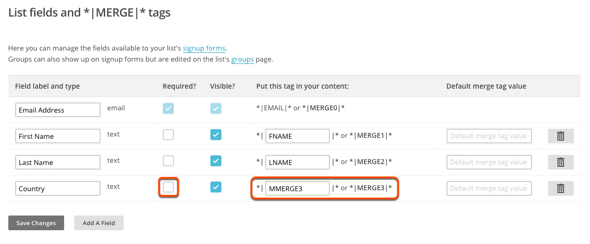
- In the left sidebar menu, navigate to Settings > Audience fields and *|MERGE|* tags.
- Identify the field that corresponds to the error shown in HubSpot.
- The value in the Put this tag in your content column matches the merge tag in the error.
- Clear the Required? checkbox for the corresponding field to allow HubSpot to sync information to this audience.
- In the bottom left, click Save Changes.