
Last updated: September 24, 2026
Available with any of the following subscriptions, except where noted:
-
 Data Hub
Enterprise
Data Hub
Enterprise
After connecting Snowflake to your HubSpot account, you can use Snowflake's Data Share to query HubSpot data from your Snowflake account.
Data lag and your Snowflake account region
You will have access to the V2_LIVE schema which is updated every 15 minutes, and the V2_DAILY schema which is updated every day.
Please note: the following views in V2_LIVE schema are only updated daily: association_definitions, owners, pipelines, and pipeline_stages.
Set up your Snowflake environment
To query your HubSpot data in Snowflake, you'll need to select the warehouse, database, and schema that you want to query from. You can either set them at the worksheet level to include them automatically in your queries, or you can manually add them.
To select your warehouse, database, and schema at the worksheet level:
- In the top row of the worksheet, click the Worksheet actions bar.

- In the pop-up window:
- Click the Warehouse dropdown menu, then select your warehouse.
- Click the Database dropdown menu, then select your HubSpot database.
- Click the Schema dropdown menu, then select the schema you want to use:
- V2_DAILY: the daily schema to query data based on tables. Data in this schema is updated once per day. Using this schema will result in faster queries, and is recommended for querying directly in Snowflake.
- V2_LIVE: the live schema based on Secure Views of HubSpot data. Data in this schema is updated up to every 15 minutes. If you’re querying a large set of data, queries may be slow. In this case, it’s recommended to copy the data into your own table first with an ETL process, then query that table.
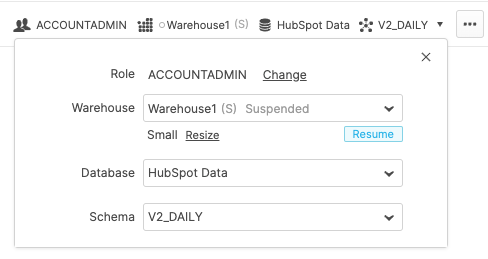
With your environment configured, you can make queries to your HubSpot data without needing to add your database or schema type to queries manually.
To manually add your database and schema type to queries, add the database name followed by the schema at the beginning of the FROM field. For example:
SELECT objectTypeId, objectId, updatedAt
FROM hubspot_share_name.V2_LIVE.objects
WHERE objectTypeId = '0-3'
LIMIT 1;
Data overview
Queries are constructed using SQL, and can be used to retrieve HubSpot data such as:
- Objects: standard and custom objects, such as contacts, companies, products.
- Records: individual records, such as an individual contact or company.
- Associations: all available association types and currently associated records.
- Events: event data for both standard HubSpot events, such as email opens, and custom behavioral events.
- Segments: HubSpot contact and company segments.
- Owners: users in your HubSpot account, in relation to the records that they're set as the owner of.
- Pipelines: deal and ticket pipelines, including pipeline stages.
- Properties: properties and their values on CRM records, including property history.
Learn more about HubSpot’s CRM data model.
Please note: As we evolve the data share, we will introduce changes, some of them breaking changes. It is highly recommended to subscribe to HubSpot’s developer change log. These changes will always be posted to the change log in advance of any update.
Limiting and ordering returned data
When constructing queries, you can control how much data gets returned, along with the order in which it's returned, by including LIMIT and ORDER BY in your query. For example, to query all contacts with their properties, but only return three results and order them by contact ID, you could construct your query as follows:
SELECT objectTypeId, updatedAt, ingestedAt
FROM objects
WHERE objectTypeId = '0-1'
ORDER BY objectId
LIMIT 10;
Column data types
When querying data in Snowflake, the columns that are returned depend on the data you're querying. You can view the available columns for a given table or view in Snowflake by selecting the view in the left sidebar.
Please note:for the rest of this doc, we use the term database object when the context applies to both tables and views.
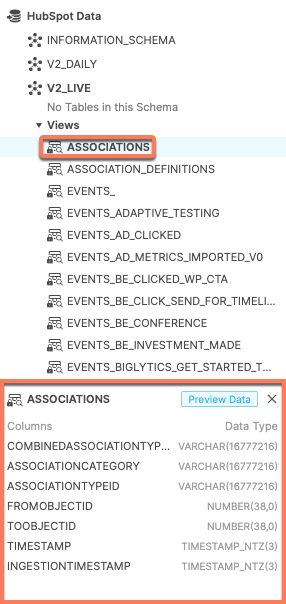
To return a specific column, include that column in the SELECT field of your query. For example, the following query will return only the OBJECTID and UpdatedAt columns
SELECT objectTypeId, updatedAt, ingestedAt
FROM objects
WHERE objectTypeId = '0-1'
ORDER BY objectId
LIMIT 10;
Below are general definitions for columns that a query might return. For other definitions not included below, see the individual view definitions in the article above.
- OBJECTTYPEID: a VARCHAR value that represents an object's type. For example, 0-1 represents the contacts object, 0-2 represents the companies object, and 2-1232 might represent a custom object in your account. In segments, this refers to the type of segment (e.g., contact or company). You can query all object and event IDs in your account using the object_and_event_type_definitions view.
- OBJECTID: a BIGINT number that represents a single record of a given type of object in your HubSpot account. To identify a record, you need to use both the object type ID and the object ID.
- INGESTEDAT: the timestamp of when a row of data was added to Snowflake, represented by a TIMESTAMP_NTZ value. Not related to the logical timestamp of a create or update operation in HubSpot.
- Due to HubSpot's internal processing, a row's ingestion timestamp may be updated even if no other columns on the row have changed.
- When building ETL processes that copy recently changed data, it's recommended to base your queries on the ingestion timestamp. In addition, if your flow copies data daily, it's recommended to copy data from the previous two days to account for delays.
- CREATEDAT and UPDATEDAT: the logical timestamp of when data was created or updated in HubSpot, represented by a TIMESTAMP_NTZ value. These timestamps will match timestamps in HubSpot. For example, the time displayed in HubSpot for a record's create date will be the same as the timestamp in the CREATEDAT column in Snowflake. These are not directly related to the ingestion timestamp, and it's not recommended to base ETL processes on these properties.
- COMBINEDASSOCIATIONTYPE: a VARCHAR value that uniquely identifies an association definition.
Transforming Data Types
Sometimes, data is returned from a query with VARCHAR columns when it would be desirable to have them as a different type. In instances like this, it is recommended to convert the VARCHAR datatype to the desired types using Snowflake functions. For instance, properties of an object record are stored as VARCHAR datatypes in most database objects, but sometimes contain number and datetime values. Functions like:
try_to_number, try_to_timestamp_ntz can be used to convert these VARCHAR data to their NUMBER and DATETIME types respectively:
SELECT objectid, value AS amount_str, try_to_number(value) AS amountFROM object_properties
WHERE objecttypeid='0-3' AND name='amount'
LIMIT 1
Object queries
Below, learn how to query data from specific HubSpot objects and records, along with the data that gets returned.
Object data is available in shared database objects. Filter by objectTypeId to retrieve a specific object type. Use OBJECT_WITH_OBJECT_PROPERTIES when you need the current properties for each record. Property values are stored in the properties JSON column. Use OBJECTS for core record attributes and OBJECT_PROPERTIES or OBJECT_PROPERTIES_HISTORY for per-property data.
| Object name | ObjectTypeId |
| Contacts | 0-1 |
| Companies | 0-2 |
| Line items | 0-8 |
Custom objects will be assigned an ID at the time of creation, and will be identified as 2-unique_ID. For example, 2-12345. Learn more about object_and_event_type_definitions.
See more details in object_with_object_properties, object_properties, objects and object_properties_history below.
object_with_object_properties
This database object contains data from your HubSpot records. Queries to this database object return one row for each record within an objecttype (e.g., all contact records in the contacts objecttype). All properties are stored in the Properties column, which is a Snowflake Variant / JSON column.
This view can return the following columns:
| Column name | Type | Description |
OBJECTTYPEID |
Varchar | The ID of the object type (e.g., contacts is 0-1). |
OBJECTID |
Number | The ID of the record (e.g., a contact record with an ID of 123752). |
PROPERTIES |
Variant | The record's property values. |
UPDATEDAT |
Timestamp | The date and time that the record was last updated in HubSpot. Learn more about column data types. |
INGESTEDAT |
Timestamp | The date and time that the data When the data was last ingested by Snowflake. |
Please note: On January 25, 2022, the column, timestamp in object_with_object_properties table and view, which represents the date and time that the object record was last updated in HubSpot, will be updatedat. This is to align with how datetime data is represented in the rest of the data share.
As this is a breaking change, the new column, updatedat has been added to the table and view. For the next 90 days, these two new columns will coexist with timestamp, the columns they are seeking to replace. This gives you an opportunity to switch to using the new columns.
After 90 days, on January 25, 2022, the column timestamp will be removed from the table and view. After this date, any attempt to query the object_with_object_properties table or view using timestamp columns will fail.
Example 1
Retrieve all contacts and their properties.
Query:
SELECT objectTypeId, objectId, propertiesFROM object_with_object_propertiesWHERE objectTypeId = '0-1'
Returns:
| OBJECTTYPEID | OBJECTID | PROPERTIES |
| 0-1 | 38960439 | {"createdate": "1504656970152"...} |
| 0-1 | 321740651 | { "createdate": "1590183081949"...} |
| 0-1 | 98392101 | { "createdate": "1533566477279"...} |
| ... | ... | ... |
Example 2
Retrieve the deal name and stage of up to three deals.
Query:
SELECTobjectId,properties:dealname::string AS dealname,properties:dealstage::string AS dealstage, properties:amount::number AS dealamountFROM object_with_object_propertiesWHERE objectTypeId = '0-3'LIMIT 3;
Returns:
| OBJECTID | DEALNAME | DEALSTAGE | DEALAMOUNT |
| 38960439 | Deal name 1 | closedlost | 7488939 |
| 321740651 | Deal name 1 | closedwon | 9292029 |
| 98392101 | Deal name 1 | closedlost | 62626528 |
objects
This database object is a subset of the data in the object_with_object_properties database object. Each returned row returns the object ID for each record. This database object only returns existing records. When a record is deleted in HubSpot, it will be removed from this database object. This database object is a subset of the data in the object_with_object_properties table. Each returned row returns the object ID for each record. This view only returns existing records. When a record is deleted in HubSpot, it will be removed from this view.
This database object contains current object data without property values. Use it when you need core record attributes only, or join it with OBJECT_PROPERTIES when you need selected properties. Using this database object with the object_properties database object makes it possible to replicate the data in object_with_object_properties, while maintaining control over which properties are returned.
This database object can return the following columns:
| Column name | Type | Description |
OBJECTTYPEID |
Varchar | The ID of the object type (e.g., contacts is 0-1). |
OBJECTID |
Number | The ID of the record (e.g., a contact record with an ID of 123752). |
INGESTEDAT |
Timestamp | The date and time that the data was last ingested by Snowflake. Learn more about column data types. |
Example 1
Retrieve all contact records.
Query:
SELECT objectTypeId, objectIdFROM objectsWHERE objectTypeId = '0-1'
Returns:
| OBJECTTYPEID | OBJECTID |
| 0-1 | 36721864 |
| 0-1 | 103580363 |
| 0-1 | 56047670 |
| ... | ... |
object_properties
This database object is a subset of the object_with_object_properties database object. Each row contains the current property value set on a given record. For example, a contact will have one row for its First name property and one row for its Last name property. If a record doesn't have a value for a property, the row will either appear with an empty string or will not appear at all.
This database object can return the following columns:
| Column name | Type | Description |
OBJECTTYPEID |
Varchar | The ID of the object type (e.g., contacts is 0-1). |
OBJECTID |
Number | The ID of the record (e.g., a contact record with an ID of 123752). |
NAME |
Varchar | The name of the property. |
VALUE |
Timestamp | The value of the property. |
UPDATEDAT |
Timestamp | The date and time that the record was last updated in HubSpot. Learn more about column data types. |
INGESTEDAT |
Timestamp | The date and time that the data When the data was last ingested by Snowflake. |
Example 1
Retrieve the first name, last name, and city properties for all contacts.
Query:
SELECT objectTypeId, objectId, name, valueFROM object_propertiesWHERE objectTypeId = '0-1'AND name IN ('firstname', 'lastname', 'city')ORDER BY objectId;
Returns:
| OBJECTTYPEID | OBJECTID | NAME | VALUE |
| 0-1 | 10401 | firstname | Brian |
| 0-1 | 10401 | city | Dublin |
| 0-1 | 10401 | lastname | Gallagher |
| 0-1 | 23451 | firstname | Fernando |
| 0-1 | 23451 | lastname | Fierro |
| 0-1 | 25751 | firstname | Charles |
| ... | ... | ... | ... |
Example 2
Retrieve the first name, last name, and lifecycle stage for all contacts, and combine them into one row per contact. This example uses the SQL PIVOT syntax.
Query:
SELECT objectId, firstname, lastname, lifecyclestage FROM(SELECT objectId, name, valueFROM object_propertiesWHERE objectTypeId = '0-1'AND name IN ('firstname', 'lastname', 'lifecyclestage'))PIVOT(MAX(value) FOR name IN ('firstname', 'lastname', 'lifecyclestage')) AS p(objectId, firstname, lastname, lifecyclestage);
Returns:
| OBJECTTYPEID | OBJECTID | FIRSTNAME | LASTNAME | LIFECYCLESTAGE |
| 0-1 | 54325098 | Hobbes | Baron | lead |
| 0-1 | 96805401 | Milo | Gold | lead |
| 0-1 | 6922028 | Henry | Riley | lead |
| ... | ... | ... | ... | ... |
object_properties_history
This database object contains historical property values. For contacts, it contains the most recent 45 values. For all other objects, it contains the most recent 20 values. Displays a row for each historical property value. The current value of a property is determined by the most recent UPDATEDAT timestamp in the property's history.
This database object can return the following columns:
| Column name | Type | Description |
OBJECTTYPEID |
Varchar | The ID of the object type (e.g., contacts is 0-1). |
OBJECTID |
Number | The ID of the record (e.g., a contact record with an ID of 123752). |
NAME |
Varchar | The name of the property. |
VALUE |
Timestamp | The value of the property. |
UPDATEDAT |
Timestamp | The date and time that the data was last updated in HubSpot. Learn more about column data types. |
INGESTEDAT |
Timestamp | The date and time that the data was last ingested by Snowflake. |
Example 1
Retrieve the history of a single property for a single contact.
Query:
SELECT objectId, name, value, updatedAtFROM object_properties_historyWHERE objectTypeId = '0-1'AND objectId = 136493192AND name = 'hs_predictivescoringtier'ORDER BY UPDATEDAT DESC;
Returns:
| OBJECTID | NAME | VALUE | UPDATEDAT |
| 136493192 |
hs_predictivescoringtier |
tier_1 |
2022-06-22 22:45:05.931 |
| 136493192 |
hs_predictivescoringtier |
tier_2 |
2021-09-18 08:20:56.622 |
| 136493192 |
hs_predictivescoringtier |
tier_3 |
2019-11-31 18:20:22.851 |
| ... |
... |
... |
... |
Example 2
Retrieve the current name of all contacts who have ever had a lifecycle stage of Subscriber.
Query:
SELECTobjectId,properties:firstname::string AS firstname,properties:lastname::string AS lastnameFROM object_with_object_propertiesWHERE object_with_object_properties.objectTypeId = '0-1'AND objectId IN (SELECT objectIdFROM object_properties_historyWHEREobject_properties_history.objectTypeId = '0-1'AND object_properties_history.name = 'lifecyclestage'AND object_properties_history.value = 'subscriber');
Returns:
| OBJECTID | FIRSTNAME | LASTNAME |
| 54325098 | Hobbes | Baron |
| 96805401 | Milo | Gold |
| 6922028 | Henry | Riley |
| ... | ... | ... |
Association queries
Association data is available in ASSOCIATIONS. Filter by combinedAssociationTypeId to retrieve a specific association type. Join ASSOCIATIONS with ASSOCIATION_DEFINITIONS to identify the related object types and association definition.
association_definitions
This database object contains information about all of the available association types between HubSpot objects, with one row per association type. You can join this database object with the associations database object to get record-specific association information.
There can be multiple types of associations between the same objects. The main association type, which is the type displayed in HubSpot when records are associated, use the association where ISMAINASSOCIATIONDEFINITION is true.
This database object can return the following columns:
| Column name | Type | Description |
COMBINEDASSOCIATIONTYPEID |
Varchar | The unique identifier of the association definition. |
CATEGORY |
Varchar | The source of the association type. One of: HUBSPOT_DEFINED, USER_DEFINED, INTEGRATOR_DEFINED |
ID |
Number | The identifier of the association definition within its category. |
FROMOBJECTTYPEID |
Varchar | The ID of the object that is the source of the association definition. |
TOOBJECTTYPEID |
Varchar | The ID of the object that is the destination of the association definition. |
NAME |
Varchar | The association definition's name. |
LABEL |
Varchar | The association definition's label. |
ISMAINASSOCIATIONDEFINITION |
Boolean | Whether the association definition is the main type. When true, the definition is the one that HubSpot displays on associated records. |
INGESTEDAT |
Timestamp | The date and time that the data was last ingested by Snowflake. Learn more about column data types. |
Example 1
Retrieve the types of associations available in your account.
Query:
SELECT combinedAssociationTypeId, fromObjectTypeId, toObjectTypeId, nameFROM association_definitionsORDER BY category, id
Returns:
| COMBINEDASSOCIATIONTYPE | FROMOBJECTTYPEID | TOOBJECTTYPEID | NAME |
| 0-1 | 0-1 | 0-2 | CONTACT_TO_COMPANY |
| 0-2 | 0-2 | 0-1 | COMPANY_TO_CONTACT |
| 0-3 | 0-3 | 0-1 | DEAL_TO_CONTACT |
| 0-4 | 0-1 | 0-3 | CONTACT_TO_DEAL |
| 0-5 | 0-3 | 0-2 | DEAL_TO_COMPANY |
| ... | ... | ... | ... |
Example 2
Retrieve the available association types between deals and companies.
Query:
SELECTcombinedAssociationTypeId, fromObjectTypeId, toObjectTypeId, nameFROM association_definitionsWHERE fromObjectTypeId = '0-3' AND toObjectTypeId = '0-2'
AND isMainAssociationDefinition = trueORDER BY category, id
Returns:
| COMBINEDASSOCIATIONTYPE | FROMOBJECTTYPEID | TOOBJECTTYPEID | NAME |
| 0-5 | 0-3 | 0-2 | DEAL_TO_COMPANY |
| 0-271 | 0-3 | 0-2 | DEAL_TO_PRIMARY_COMPANY |
| 0-341 | 0-3 | 0-2 | DEAL_TO_COMAPNY_UNLABELED |
associations
This database object contains information about the associations between specific records. Each row represents an association from one object to another object. Rows may be present in this database object even though the referenced records have been deleted. You can check whether records exist by joining with the objects table.
This database object contains association records for all association types. Filter by combinedAssociationTypeId and join with ASSOCIATION_DEFINITIONS when you need association metadata.
This database object can return the following columns:
| Column name | Type | Description |
COMBINEDASSOCIATIONTYPEID |
Varchar | The unique identifier of the association definition. |
FROMOBJECTID |
Number | The ID of the source object. |
TOOBJECTID |
Number | The ID of the destination object. |
INGESTEDAT |
Timestamp | The date and time that the data was last ingested by Snowflake. Learn more about column data types. |
Example 1
Retrieve all associated deals and contacts.
Query:
SELECT combinedAssociationTypeId, fromObjectId, toObjectIdFROM associationsWHERE combinedAssociationTypeId = '0-5'
Returns:
| COMBINEDASSOCIATIONTYPEID | FROMOBJECTID | TOOBJECTID |
| 0-5 | 6626541373 | 233620335 |
| 0-5 | 6616436082 | 3866015468 |
| 0-5 | 6690805943 | 7132752747 |
| ... | ... | ... |
Example 2
Retrieve all tickets associated with a specific contact (contact ID: 3005).
Query:
SELECT combinedAssociationTypeId, fromObjectId, toObjectIdFROM associationsWHERE associationCategory = 'HUBSPOT_DEFINED'AND combinedAssociationTypeId = '0-15'AND fromObjectId = 3005;
Returns:
| COMBINEDASSOCIATIONTYPE | FROMOBJECTID | TOOBJECTID |
| 0-5 | 6626541373 | 233620335 |
Example 3
Retrieve all deals associated with a specific contact (contact ID: 4464). Instead of hard-coding combinedAssociationTypeId, this example joins with association_definitions.
Query:
SELECT combinedAssociationTypeId, fromObjectId toObjectId,FROM associationsWHEREcombinedAssociationTypeId = (SELECT combinedAssociationTypeId FROM association_definitions WHERE fromObjectTypeId = '0-1' AND toObjectTypeId = '0-3' AND isMainAssociationDefinition)AND fromObjectId = 4464;
Returns:
| COMBINEDASSOCIATIONTYPEID | FROMOBJECTID | TOOBJECTID |
| 0-5 | 6626541373 | 233620335 |
Owner queries
owners
This database object contains information about the users in your HubSpot account. Users can be set as record owners, and will contain both a user ID and an owner ID, depending on their context. Both IDs can be used to identify the same user.
This database object can return the following columns:
| Column name | Type | Description |
OWNERID |
Number | The user's owner ID. |
USERID |
Number | The user's user ID. User's with NULL in this column have been deleted. |
EMAIL |
Varchar | The user's email address. |
FIRSTNAME |
Varchar | The user's first name. |
LASTNAME |
Varchar | The user's last name. |
ARCHIVED |
Boolean | Whether the user has been deleted. |
CREATEDAT |
Timestamp | The date and time that the user was created in HubSpot. See column data types for more information. |
UPDATEDAT |
Timestamp | The date and time that the user was last updated in HubSpot. See column data types for more information. |
INGESTEDAT |
Timestamp | The date and time that the data was last ingested by Snowflake. |
Example 1
Retrieve all users. The WHERE archived = false filter removes deleted users from the returned data.
Query:
SELECT ownerId, userId, email, firstname, lastname
FROM owners
WHERE archived = false
Returns:
| OWNERID | USERID | FIRSTNAME | LASTNAME | |
| 29584574 | 4621126 | 233620335 | Hobbes | Baron |
| 30532717 | 4874784 | 3866015468 | Pablo | Walters |
| 30580321 | 925511 | 7132752747 | Milo | Gold |
| ... | ... | ... | ... | ... |
Example 2
Retrieve a specific owner by their owner ID.
Query:
SELECT ownerId, userId, email, firstname, lastnameFROM ownersWHERE ownerId = 29584574;
Returns:
| OWNERID | USERID | FIRSTNAME | LASTNAME | |
| 29584574 | 4621126 | 233620335 | Hobbes | Baron |
Example 3
Retrieve all contacts and their owners. This query joins records to owners with object_with_object_properties and the contact property hubspot_owner_id.
SELECT
contact.objectId AS contact_id,
contact.properties:firstname::string AS contact_firstname,
contact.properties:lastname::string AS contact_lastname,
contact.properties:hubspot_owner_id::number AS contact_hubspot_owner_id,
owner.firstname AS owner_firstname,
owner.lastname AS owner_lastname,
owner.email AS owner_email
FROM object_with_object_properties AS contact
JOIN owners AS owner
ON contact.properties:hubspot_owner_id::number = owner.ownerId
WHERE contact.objectTypeId = '0-1';
Returns:
| CONTACTID | CONTACT_FIRSTNAME | CONTACT_LASTNAME | CONTACT_HUBSPOT_OWNER_ID | OWNER_FIRSTNAME | OWNER_LASTNAME | OWNER_EMAIL |
| 113834202 | Richard | Greenfield | 29584574 | Hobbes | Baron | hobbes.b@business.com |
| 53540801 | Ford | Karl | 30241125 | Milo | Gold | milo.g@business.com |
| ... | ... | ... | ... | ... | ... | ... |
Team queries
teams
Teams in HubSpot let you organize your users into groups for organizational and reporting purposes. You can have a main team and extra teams.
This database object contains information about the teams in your HubSpot account.
This database object can return the following columns:
| Column name | Type | Description |
| TEAMID | Number | The team ID. |
| TEAMNAME | Varchar | The team name. |
| PARENTTEAMID | Number | The team ID of the parent team. |
| CHILDTEAMIDS | Array | The team IDs of the child teams. |
| PRIMARYOWNERMEMBERS | Varchar | The owner IDs of the team primary members. |
| SECONDARYOWNERMEMBERS | Boolean | The owner IDs of the team secondary members. |
| INGESTEDAT | Timestamp | The date and time that the data was last ingested by Snowflake. |
Example 1
Retrieve all teams.
Query:
SELECT teamId,teamName, primaryOwnerMembers
FROM teams
Returns:
| TEAMID | TEAMNAME | PRIMARYOWNERMEMBERS |
| 29584574 | Sub Team | [233620335, 1234553] |
| 30532717 | Super Team | [3866015468, 126221873] |
| 3058032 | A Team | [7132752747] |
owner_team
This database object contains information about which owners correspond to which teams in your HubSpot account.
This database object can return the following columns:
| Column name | Type | Description |
| TEAMID | Number | The team ID. |
| OWNERID | Number | The user's owner ID. |
| ISTEAMPRIMARY | Boolean | Whether this team is the primary team for this owner. |
| INGESTEDAT | Timestamp | The date and time that the data was last ingested by Snowflake. |
Example 1
Retrieve all owners for a given team.
Query:
SELECT teamId, ownerId, isTeamPrimaryFROM teamsWHERE teamId = 29584574
Returns
| TEAMID | TEAMNAME | ISTEAMPRIMARY |
| 29584574 | 233620335 | TRUE |
| 29584574 | 1234553 | TRUE |
Pipeline queries
Below, learn how to query deal and ticket pipeline data, such as the available pipelines in your account and their stages.
You can join this data with object data for a full view of your pipelines. For example, you can query deals and their pipelines by joining object_with_object_properties with pipelines.
pipelines
This database object contains information about the deal and ticket pipelines in your account. Each returned row represents a single pipeline.
This table can return the following columns:
| Column name | Type | Description |
PIPELINEID |
Varchar | The pipeline's ID. |
OBJECTTYPEID |
Varchar | The ID of the object that the pipeline can contain (e.g., deals or tickets). |
LABEL |
Varchar | The pipeline's name in HubSpot. |
DISPLAYORDER |
Number | The order in which the pipeline is displayed in HubSpot. |
ARCHIVED |
Boolean | Whether the pipeline has been deleted. |
CREATEDAT |
Timestamp | When the pipeline was created. |
UPDATEDAT |
Timestamp | The date and time that the data was last updated in HubSpot. Learn more about column data types. |
INGESTEDAT |
Timestamp | The date and time that the data was last ingested by Snowflake. |
Example 1
Retrieve all available deal pipelines, ordered by their order in HubSpot.
Query:
SELECT objectTypeId, pipelineId, labelFROM pipelinesWHERE objectTypeId = '0-3' AND not archivedORDER BY displayorder;
Returns:
| OBJECTTYPEID | PIPELINEID | LABEL |
| 0-3 | 1bed503c-37f7-4f51-9d40-7598902673f4 | Sales Pipeline |
| 0-3 | 12659678 | Licenses Pipeline |
| 0-3 | 75e28846-ad0d-4be2-a027-5e1da6590b98 | New Business |
| ... | ... | ... |
Example 2
Retrieve deals within a specific pipeline by using object_with_object_properties.
SELECT
deals.objectId deal_id,
deals.properties:dealname::varchar deal_name,
pipelines.label pipeline_name
FROM object_with_object_properties deals
INNER JOIN pipelines
ON deals.objectTypeId = pipelines.objectTypeId
AND deals.properties:pipeline::string = pipelines.pipelineid
WHERE deals.objecttypeId = '0-3'
AND pipelines.objectTypeId = '0-3';
Returns:
| DEAL_ID |
DEAL_NAME |
PIPELINE_NAME |
| 605140072 |
Meowmix Global Signup |
Sales Pipeline |
| 605457408 |
Friskies Rebrand |
Sales Pipeline |
| 604362473 |
Fresh Step App Build |
Sales Pipeline |
pipeline_stages
This view contains information about individual stages within a pipeline. Identify stages by combining object type ID, pipeline ID, and stage ID. When joining with pipelines, use the object type ID and pipeline ID.
This database object can return the following columns:
| Column name | Type | Description |
PIPELINEID |
Varchar | The pipeline's ID. |
STAGEID |
Varchar | The stage's ID. |
LABEL |
Varchar | The stage's name in HubSpot. |
DISPLAYORDER |
Number | The order in which the pipeline is displayed in HubSpot. |
METADATA |
Variant | A JSON formatted description of the stage including whether it is open or closed |
ARCHIVED |
Boolean | Whether the pipeline stage has been deleted. |
CREATEDAT |
Timestamp | When the pipeline stage was created. |
Example 1
Retrieve pipeline stages for a deal pipeline named Sales pipeline.
Query:
SELECT pipelineid, stageId, labelFROM pipeline_stagesWHERE not archivedAND pipelineid = (SELECT pipelineid FROM pipelines WHERE objectTypeId = '0-3' AND not archived AND label = 'Sales Pipeline' LIMIT 1)ORDER BY displayorder;
Returns:
| PIPELINEID | STAGEID | LABEL |
| 941650 | 941651 | Contacted |
| 941650 | 941652 | Appt scheduled |
| 941650 | 941653 | Invoice sent |
| ... | ... | ... |
Example 2
Retrieve all deals and their respective pipeline stages.
Query:
SELECTdeals.objectId deal_id,deals.properties:dealname::varchar deal_name,pipelines.label pipeline_name,pipeline_stages.label pipeline_stage_nameFROM object_with_object_properties dealsINNER JOIN pipelinesON deals.objectTypeId = pipelines.objectTypeIdAND deals.properties:pipeline::string = pipelines.pipelineidINNER JOIN pipeline_stagesON deals.objectTypeId = pipeline_stages.pipelineidAND deals.properties:pipeline::string = pipeline_stages.pipelineidAND deals.properties:dealstage::string = pipeline_stages.stageIdWHERE deals.objecttypeId = '0-3';
Returns:
| DEAL_ID | DEAL_NAME | PIPELINE_NAME | PIPELINE_STAGE_NAME |
| 605140072 | Meowmix Global Signup | Sales Pipeline | Contract sent |
| 605457408 | Friskies Rebrand | Sales Pipeline | Appt scheduled |
| 604362473 | Fresh Step App Build | Sales Pipeline | Contract signed |
| ... | ... | ... | ... |
Property queries
property_definitions
This database object contains information about object properties and event properties in your HubSpot account. Event properties include standard events, such as email opens and clicks, and custom behavioral event properties. This information can be helpful for defining values found in object_properties and events data.
You can identify specific properties by combining their object type ID and name. You can retrieve similar information using the properties API.
This database object can return the following columns:
| Column name | Type | Description |
OBJECTYPEID |
Varchar | The ID of the object that the event relates to. |
NAME |
Varchar | The property's internal name. |
LABEL |
Varchar | The property's label. |
DESCRIPTION |
Varchar | The property's description. |
TYPE |
Varchar | The property's type (e.g., string, number, datetime). |
FIELDTYPE |
Varchar | The property's field type. Defines how the property displays in HubSpot and on forms (e.g., checkbox, select). |
DISPLAYORDER |
Number | The property's display order. |
GROUPNAME |
Varchar | The property's group name. |
OPTIONS |
Variant | For enumeration properties, an array of the property's options, including each option's attributes (e.g., display order, label). |
CREATEDUSERID |
Number | The ID of the user who created the property. |
REFERENCEDOBJECTTYPE |
Varchar | The type of object that the property references. Owner properties will return a value of OWNER. |
CALCULATED |
Boolean | Whether the property is a calculated property. |
EXTERNALOPTIONS |
Boolean | Whether the property's options are defined in an external system. |
HASUNIQUEVALUE |
Boolean | Whether the property's values are unique. Can only be set when creating a property through the API. |
HIDDEN |
Boolean | Whether the property is hidden in HubSpot. |
SHOWCURRENCYSYMBOL |
Boolean | Whether a number property value is formatted as a currency. |
FORMFIELD |
Boolean | Whether this property can be used in forms. |
READONLYDEFINITION |
Boolean | Whether the property can be edited in HubSpot. |
READONLYVALUE |
Boolean | Whether the property's value can be edited in HubSpot. |
HUBSPOTDEFINED |
Boolean | Whether the property was created by HubSpot, versus created by a user. |
ARCHIVED |
Boolean | Whether the property has been deleted. |
CREATEDAT |
Timestamp | The date and time that the property was created in HubSpot. |
UPDATEDAT |
Timestamp | The date and time that the data was last updated in HubSpot. Learn more about column data types. |
INGESTEDAT |
Timestamp | The date and time that the data was last ingested by Snowflake. |
Example 1
Retrieve the names and descriptions for all contact properties.
Query:
SELECT name, label, descriptionFROM property_definitionsWHERE objectTypeId = '0-1'
Returns:
| NAME | LABEL | DESCRIPTION |
| entered_sql_stage | Entered SQL stage | Start count SQL stage days. |
|
first_conversion_event_name
|
First Conversion | The first form this contact submitted. |
| address | Street address | The contact's address. |
Event queries
Events include standard HubSpot events and custom behavioral events. Each event has its own database object, labeled as events_eventname.
| Name | |
| EVENTS_AD_INTERACTION | Details of an Ad and contacts that interacted with it by clicking on the ad or submitting a form after engaging with it. |
| EVENTS_AD_METRICS_IMPORTED_V0 |
Details of an Ad and and its performance metrics. |
| EVENTS_CALL_MENTIONED_KEYWORD | Details of keywords mentioned by any participants in calls. |
| EVENTS_CLICKED_LINK_IN_EMAIL_V2 |
Links clicked in marketing emails by contacts. |
| EVENTS_CLICKED_LINK_IN_TRACKED_INBOX_EMAIL_V8 | Links clicked in Conversations Inbox emails by contacts. |
| EVENTS_COOKIE_BANNER_CLICKED | Contacts who clicked on cookies. |
| EVENTS_COOKIE_BANNER_VIEWED | Contacts who viewed cookies. |
| EVENTS_DOCUMENT_SHARED_V2 | Sales Documents shared with contacts via an external link. |
| EVENTS_DOCUMENT_VIEWED_V2 | Sales Documents and contacts that have viewed by them by opening the external link. |
| EVENTS_DOCUMENT_COMPLETED_V2 | Sales Documents and contacts that have closed them out. |
| EVENTS_HS_SCHEDULED_EMAIL_V2 | Emails submitted to the HubSpot email servers to be sent. |
| EVENTS_MTA_DELIVERED_EMAIL_V2 | Emails successfully delivered to the recipients by HubSpot email servers. |
| EVENTS_MTA_BOUNCED_EMAIL_V2 | Email delivery attempts that were rejected by the recipient’s Email server. |
| EVENTS_OPENED_EMAIL_V2 | Email opens by contacts. |
| EVENTS_REPORTED_SPAM_EMAIL_V2 | Emails marked as spam by recipients. |
| EVENTS_UPDATED_EMAIL_SUBSCRIPTION_STATUS_V2 | Changes to email email subscriptions by recipients. |
| EVENTS_OPENED_TRACKED_INBOX_EMAIL_V8 | Conservations Inbox email opens by contacts. |
| EVENTS_MB_MEDIA_PLAYED | Video playback activity by contacts. |
| EVENTS_V2_CONTACT_BOOKED_MEETING_THROUGH_SEQUENCE | Contact booked a meeting through sequence. |
| EVENTS_V2_CONTACT_ENROLLED_IN_SEQUENCE | Contact enrolled from sequence. |
| EVENTS_V2_CONTACT_FINISHED_SEQUENCE | Sequence finished. |
| EVENTS_V2_CONTACT_REPLIED_SEQUENCE_EMAIL | Contact replied to email (or incoming email which unenrolled sequence) sent through sequence. |
| EVENTS_V2_CONTACT_UNENROLLED_FROM_SEQUENCE | Contact unenrolled from sequence. |
| EVENTS_V2_CONTACT_UNENROLLED_MANUALLY_FROM_SEQUENCE | User manually unenrolled the contact. |
| EVENTS_V2_CONTACT_UNSUBSCRIBED_SEQUENCE_EMAIL | Contact unsubscribed, unenrolling the sequence. |
| EVENTS_V2_SEQUENCE_EMAIL_BOUNCED | Sequence email bounced. |
| EVENTS_V2_SEQUENCE_ERRORED | Sequence errored causing unenrollment. |
| EVENTS_V2_SEQUENCE_STEP_EXECUTED | Sequence step executed. |
| EVENTS_VISITED_PAGE | Website page visits by contacts. |
| EVENTS_<INTEGRATION_EVENT_NAME>_<UNIQUE_IDENTIFIER> | Integration events (Timeline V3 API) |
You can identify events by combining their event type ID and ID. The columns that get returned depend on the event, with one column for each event property. All events will return the following columns:
Please note: HubSpot has added two new columns to all event tables and views:
occurredatoccurredatdateint
These columns will be replacing the occuredat and occuredatdateint columns on November 24, 2022. On that date, the old columns will no longer be available, and attempts to query a database object or view containing events using those columns will fail. Learn more about breaking changes for Snowflake data shares.
| Column name | Type | Description |
EVENTTYPEID |
Varchar | The ID of the event type, similar to OBJECTTYPEID You can query all eventype IDs in your account using the object_and_event_type_definitions view. |
ID |
Varchar | This is unique per event type. No two records will have the same ID within a given event type. |
OBJECTTYPEID |
Varchar | The type of object that completed the event. For example, an email link click would display 0-1 in this column, representing the contacts object. |
OBJECTID |
Number | The ID of the record that completed the event. |
OCCURREDAT |
Timestamp | When the event occurred. |
|
|
Number | A number representing when the event occurred. Contains the same data as the OCCURREDAT column, but formatted as a number and used as a part of the cluster key of the table. In most cases, you can use the OCCURREDAT timestamp instead of this number. |
|
|
Number | A number representing when the event occurred. Contains the same data as the Please note: this column will be deprecated on November 24, 2022 and replaced with |
OCCUREDAT |
Timestamp | When the event occurred. Please note: this column will be deprecated on November 24, 2022 and replaced with |
INGESTEDAT |
Timestamp | The date and time that the data was last ingested by Snowflake. Learn more about column data types. |
PROPERTY_* |
Varchar | Individual columns containing the event properties. |
Example 1
Retrieve the 50 most recent email click events.
Query:
SELECT eventTypeId, objectTypeId, objectId, occuredAt, property_hs_click_raw_url AS hs_click_raw_urlFROM events_clicked_link_in_email_V2
ORDER BY occuredAt
LIMIT 50;
Returns:
| EVENTTYPEID | OBJECTTYPEID | OBJECTID | OCCUREDAT | HS_CLICK_RAW_URL |
| 4-666288 | 0-1 | 45318579 | 2016-08-04 21:06:43.245 | http://website.com?utm_campaign=Launch&utm_source=hs_email&utm_medium=email&utm_content=32520579 |
| 4-666288 | 0-1 | 80701 | 2016-08-29 13:31:28.622 | https://cta-image-cms2.hubspot.com/ctas/v2/public/cs/ci/?pg=f0f6585a-08fc-4273-8422-49cfaddcf8d8&pid=1976760&ecid=ACsprvtkRbakerw4BiWlaDL7xFAqau1aW9m1_PAqSfQiWarY69X7Ds42zHGYTCfhHJLrXUP86Nxu |
| 4-666288 | 0-1 | 26146013 | 2017-11-30 14:27:11.528 | https://hubs.ly/H097a37a?utm_source=hs_email&utm_medium=email&utm_content=58251290 |
| ... | ... | ... | ... | ... |
Example 2
Retrieve all email click events by the contacts who clicked. This query get contact data by joining with object_with_object_properties.
Query:
SELECT
click.occuredat click_timestamp,
click.property_hs_click_raw_url click_url,
contact.properties:firstname::varchar contact_firstname,
contact.properties:lastname::varchar contact_lastname
FROM events_clicked_link_in_email_V2 click
LEFT JOIN object_with_object_properties contact
ON click.objectTypeId = contact.objectTypeId
AND click.objectId = contact.objectId
LIMIT 3;
Returns:
| CLICK_TIMESTAMP | CLICK_URL | CONTACT_FIRSTNAME | CONTACT_LASTNAME |
| 2019-01-04 22:35:41.264 | https://help.website.com/articles/tutorial/how-to-use-email-tool?utm_source=hs_automation&utm_medium=email&utm_content=68042217 | Hobbes | Baron |
| 2018-11-08 09:37:41.400 | https://www.website.net/webinar-case-study?utm_source=hs_automation&utm_medium=email&utm_content=55200164 | Milo | Gold |
| 2018-11-08 09:37:41.426 | https://www.website.net/contact?utm_source=hs_automation&utm_medium=email&utm_content=55200164 | Harlow | Villari |
| ... | ... | ... | ... |
Object_and_event_type_queries
object_and_event_type_definitions
This database object contains definitions for all objects and events available in your HubSpot account.
This database object can return the following columns:
| Column name | Type | Description |
OBJECTTYPEID |
Varchar | The ID of the object that the pipeline can contain (e.g., deals or tickets). |
FULLYQUALIFIEDNAME |
Varchar | The name of the object or event. |
INGESTEDAT |
Timestamp | The date and time that the data was last ingested by Snowflake. Learn more about column data types. |
Example 1
Retrieve all objects and events available in your HubSpot account.
Query:
SELECT objectTypeId, fullyQualifiedNameFROM object_and_event_type_definitions;
Returns:
| OBJECTTYPEID | FULLYQUALIFIEDNAME |
| 0-1 | CONTACT |
| 0-8 | LINE_ITEM |
| 0-11 | CONVERSATION |
| ... | ... |
Segments queries
Below, learn how to query your segments, such as the available contact and company segments and the records included in those segments.
segments
This database object contains information about HubSpot contact and company segments. Returns one row per segment, and columns include segment details such as segment name, size, and the object type of the records it contains. Does not contain information about the individual records within each segment (see segment_membership).
This database object can return the following columns:
| Column name | Type | Description |
OBJECTTYPEID |
Varchar | The type of records in the segment (e.g., contact or company). |
SEGMENTID |
Number | The ID of the segment. Joins to the SEGMENTID column in the segment-memberships table. |
CLASSICSEGMENTID |
Number | An ID specific to contact segments that matches the ID in the URL of the segment in HubSpot. |
NAME |
Varchar | The name of the segment. |
SIZE |
Number | The number of records in the segment. |
CREATEDBYUSERID |
Number | The ID of the user who created the segment. |
CREATEDAT |
Timestamp | When the segment was created in HubSpot. |
UPDATEDBYUSERID |
Number | The ID of the user who most recently updated the segment. |
UPDATEDAT |
Timestamp | The date and time that the date was last updated in HubSpot. Learn more about column data types. |
INGESTEDAT |
Timestamp | The date and time that the data was last ingested by Snowflake. |
Example 1
Retrieve all contact segments.
Query:
SELECT segmentId, name, sizeFROM segmentsWHERE objectTypeId = '0-1';
Returns:
| SEGMENTSID | NAME | SIZE |
| 118131 | Weekly outreach | 103 |
| 66156 | Blog subscribers | 455 |
| 771852 | Top subscribers 2021 | 37 |
| ... | ... | ... |
Example 2
Retrieve a specific contact segment named Top subscribers 2021.
Query:
SELECT segmentId, name, size FROM segmentsWHERE objectTypeId = '0-1'
ANDsegmentName = 'Top subscribers 2021';
Returns:
| SEGMENTID | NAME | SIZE |
| 771852 | Top subscribers 2021 | 37 |
segment_membership
This database object contains information about which records are members of which segments, with one row per record in the segment. For example, if you have a Blog subscribers segment with 500 contacts, the database object will return 500 rows.
Only contains segment IDs and object IDs. For more information, join with the segments database object.
This database object can return the following columns:
| Column name | Type | Description |
SEGMENTID |
Varchar | The ID of the segment. Joins to the HS_SEGMENT_ID column in the segments table. |
OBJECTID |
Varchar | The ID of the record in the segment. |
UPDATEDAT |
Timestamp | The date and time that the data was last updated in HubSpot. Learn more about column data types. |
INGESTEDAT |
Timestamp | The date and time that the data was last ingested by Snowflake. |
Example 1
Retrieve the IDs of all contacts in the Top subscribers 2021 segment.
Query:
SELECT objectIdFROM segment_membershipsINNER JOIN segmentsON segment_memberships.segmentId = segments.segmentIdWHERE segments.objectTypeId = '0-1'AND segments.name = 'Top Subscribers 2021';
Returns:
| OBJECTID |
| 54325098 |
| 96805401 |
| 6922028 |
| ... |
Example 2
Retrieve the first and last names of details of contacts in the Top subscribers 2021 segment.
Query:
SELECT
contact.objectId AS object_id,
contact.properties:firstname::string AS firstname,
contact.properties:lastname::string AS lastname
FROM object_with_object_properties AS contact
INNER JOIN segment_memberships AS membership
ON contact.objectId = membership.objectId
INNER JOIN segments
ON membership.segmentId = segments.segmentId
WHERE contact.objectTypeId = '0-1'
AND segments.objectTypeId = '0-1'
AND segments.name = 'Top Subscribers 2021';
Returns:
| OBJECTID |
FIRST NAME |
LAST NAME |
| 54325098 |
Hobbes |
Baron |
| 96805401 |
Milo |
Gold |
| 6922028 |
Henry |
Riley |
| ... |
... |
... |
FAQs
I want to generate data similar to a report from the Hubspot app, how do I go about that?
Generally, you would want to look at the columns present in the report you are comparing with. If the report visualization is not tabular, converting it to a table will show the columns the report contains. These columns are usually properties of an object type or an event type. Next step is to figure out the object type property a column corresponds to. You can do this by querying property_definitions:
SELECT * FROM property_definitions
WHERE label = [column_name]
There might not always be an exact match because some property names are usually resolved to a more descriptive name on the app. In cases like this, doing a fuzzy search using the LIKE operator on the label(or even the description) column in property_definitions can help.
After determining which objecttype the column belongs to, it’s trivial to determine what to query. Query object_with_object_properties and filter by the objectTypeId for that type. Read the needed property values from the properties JSON column.
How do I link this data type to another, e.g how to retrieve forms for a campaign?
To retrieve forms associated with each campaign, join OBJECT_WITH_OBJECT_PROPERTIES, ASSOCIATIONS, and ASSOCIATION_DEFINITIONS.
SELECT DISTINCT
campaigns.properties:hs_name::string AS campaign_name,
forms.properties:hs_form_id::string AS form_id
FROM object_with_object_properties AS campaigns
JOIN associations AS association
ON association.fromObjectId = campaigns.objectId
JOIN association_definitions AS definition
ON definition.combinedAssociationTypeId =
association.combinedAssociationTypeId
JOIN object_with_object_properties AS forms
ON forms.objectId = association.toObjectId
WHERE campaigns.objectTypeId = '0-35'
AND forms.objectTypeId = '0-28'
AND definition.fromObjectTypeId = '0-35'
AND definition.toObjectTypeId = '0-28';
How do I know the status of the HubSpot-Snowflake integration?
To receive real-time status updates about outages and issues for the HubSpot-Snowflake integration, query the data_share_status view:
SELECT * FROM hubspot.public.data_share_status
 LIMIT 1
The results will be displayed as:
| STATUS | MESSAGE | UPDATEDAT |
| OK | NO KNOWN INCIDENT AT THE MOMENT | 2023-04-10 09:21:20.123 |
This view provides updates on the integration status in reverse chronological order. Integrating the results of this query into a dashboard will help you track the integration's performance and detect any downtime or outages.
