
Last updated: September 11, 2026
Available with any of the following subscriptions, except where noted:
-
 Marketing Hub
Professional, Enterprise
Marketing Hub
Professional, Enterprise
Connect your Reddit account to HubSpot's social tool to create and publish posts to specific subreddits or your user profile. By integrating Reddit with HubSpot, you can take part in community discussions and manage engagement by replying to comments and direct mentions alongside your other social activity.
For example, you can post to a subreddit like r/Entrepreneur to share ideas, then reply to comments directly from your HubSpot account.
Before you get started
- Connect your Reddit account to HubSpot.
- You can only create and publish Reddit posts through HubSpot on desktop. This feature is not available in the HubSpot mobile app.
Create and publish Reddit text posts
Permissions required All accessible accounts or Their connected accounts Social permissions are required to create and publish social posts. Users with Draft only Social permissions can create draft posts, but cannot publish.
-
In your HubSpot account, click More, then navigate to Marketing > Social. If More doesn't appear in your account, navigate to Marketing > Social directly.
- In the upper right, click Create post or Create, then select Create from scratch.
- In the upper left of the social composer, click the Select accounts dropdown menu. Then, select the checkboxes next to the Reddit accounts you want to post to.
- In the upper left, click the Reddit icon to draft your post specifically for Reddit.
- Click the Post to dropdown menu. Select the subreddit (e.g., r/Entrepreneur) or the connected Reddit profile (e.g., u/username) where your post will be published.
- Click [subreddit] rules and Reddit's rules to review the rules and community guidelines before posting to the selected subreddit.
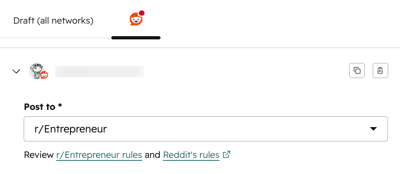
- To create your text post, enter the following fields:
- Title: enter the post's title using up to 300 characters. This field is required.
- Body text: enter the post's body using up to 40,000 characters.
- To add additional content to the body text:
- Insert emoji: click the emoji icon and select an emoji.
- Attach content: click the file icon to insert a HubSpot-hosted page or blog post in your reply. In the dialog box, click the dropdown menus and select the content you want to attach. Click Attach.
- Generate with assistant: click the AI icon to automatically generate the social post and hashtags. Learn how to manage AI settings.
- To add flair to your post, click Add flair. Flair is used to categorize your post, allowing users to find your content by searching for the specific flair term.
- Search for or select the flair to apply to your post. Click Add.
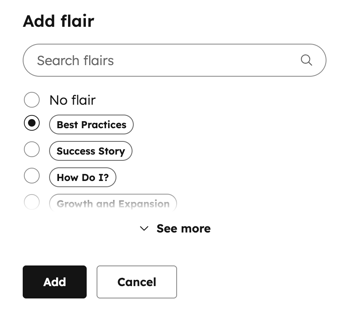
- To schedule your post, click to expand the Schedule post section, then select your publishing option:
- Publish now: publish the post immediately.
- Schedule for later: select a specific date and time to publish the post. You can also select a default time from your social publishing schedule.
- To associate your post with a campaign, click to expand the Add to campaign section.
- Click the Select a campaign dropdown menu and select a campaign.
- In the top right, click Review & Publish or Review & Schedule. You can also continue editing posts for other social networks before publishing. Learn more about creating and publishing social posts.
Review published Reddit posts
After publishing your Reddit post, review post details in the manage tab. Learn more about reviewing your published social posts.
-
In your HubSpot account, click More, then navigate to Marketing > Social. If More doesn't appear in your account, navigate to Marketing > Social directly.
- On the Manage tab, hover over your published post and click Details.
- In the right panel, review the following metrics:
- Score: the net total of upvotes and downvotes on your post.
- Comments: the number of comments on your post.
- To view the post on the social network, click Actions and select View on Reddit.
Reply to Reddit comments and direct mentions
Review and reply to Reddit comments and direct mentions in the reply tab. Learn more about how to review and manage social interactions.
-
In your HubSpot account, click More, then navigate to Marketing > Social. If More doesn't appear in your account, navigate to Marketing > Social directly.
- At the top, click the Reply tab.
- To upvote or downvote an interaction, click the arrow icons on the interaction.
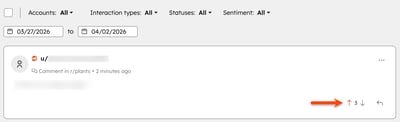
- To reply to an interaction, click the reply icon on the interaction. The post's details and thread will open in the right panel.
- To use a reply recommendation, use the following options:
- Insert: apply the reply recommendation and edit the content in the text box.
- Dismiss: close the reply generator and manually enter your own reply.
- Refine: update the reply recommendation and apply your brand identity, expand, shorten, or change the tone of the message.
- To add content to your reply, use the following options:
- Attach content: click the file icon to link a HubSpot-hosted page or blog post in your reply. In the dialog box, click the dropdown menus and select the content you want to attach. Click Attach.
- Insert emoji: click the emoji icon and select an emoji to add to your reply.
- Quick reply: click the AI icon to generate a reply recommendation.
- To change the account that you're replying from, click the profile image and select from your connected Reddit accounts.
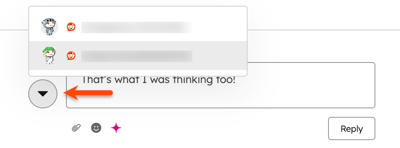
- At the bottom, click Reply.
Please note: assigning a CRM contact is not available for Reddit interactions.
What's next
After publishing your Reddit posts, continue to:
- Learn how to analyze social reports.
- Create custom social reports using the custom report builder.
