
Last updated: May 26, 2026
Available with any of the following subscriptions, except where noted:

The HubSpot Sales Office 365 add-in allows you to track and log emails, and use HubSpot sales tools directly in your Outlook inbox. The add-in can be used in Outlook for Windows, Outlook for Mac, or Outlook for the web. Learn more about system requirements.
Once installed, the steps to access the add-in vary based on the Outlook version you're using. Learn more about accessing add-ins in Outlook.
In the table below, hover over the icon to view the add-in for each Outlook version.
| Outlook version | Access the add-in |
|
Classic Outlook for Windows or Mac 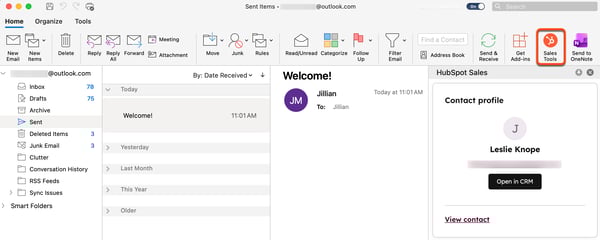
|
At the top of Outlook, in the main ribbon, click Sales Tools. |
|
New Outlook for Mac 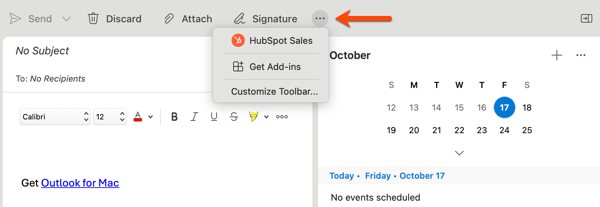
|
At the top of Outlook, in the main ribbon, click the three horizontal dots. Then, select HubSpot Sales. Click Customize Toolbar to add HubSpot Sales to your toolbar. |
|
New Outlook for Windows Outlook on the web 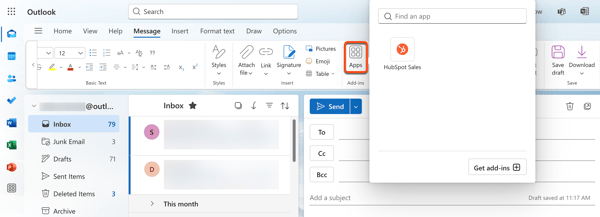
|
At the top of Outlook, in the main ribbon, click Apps, then select HubSpot Sales. |
In order to use the HubSpot Sales Office 365 add-in, your inbox must be connected to HubSpot. Any preferences set for tracking and logging emails are only applied when the HubSpot Sales sidebar pane is open when composing each email. You can pin the task pane open in your inbox to ensure your emails are always logged and tracked.

This guide provides a list of resources to get you started with the HubSpot Sales Office 365 add-in:
Set up
Use the add-in
- Track and log emails with the HubSpot Sales Office 365 add-in
- Log your sent and received emails to the CRM
- Use sales tools with the HubSpot Sales Office 365 add-in
- Use contact profiles with the HubSpot Sales Office 365 add-in
Troubleshoot the add-in
