
Last updated: September 15, 2026
Available with any of the following subscriptions, except where noted:
-
 Revenue Hub
Professional, Enterprise
Revenue Hub
Professional, Enterprise
-
 Seats required
Contracts are the centralized source of truth for committed revenue in HubSpot. By managing contracts in HubSpot, you can record and manage existing contract agreements, manually record payments or automatically bill buyers, make updates over the duration of a contract, renew contracts, and accurately report revenue.
After setting up contracts, learn how to create contracts from accepted quotes. If you'd prefer to directly create contracts without the buyer accepting a quote, learn more about directly creating contracts (BETA). Learn more about how contracts are used in HubSpot.
 Developer resources
Learn more about building custom solutions using the Contracts API.
Before you get started
Understand requirements
Accepted quotes can create contracts whether or not you're enrolled in the Connected CPQ, Billing, and Payments beta. If you're not enrolled in the beta, payment collection remains tied to the existing quote or standalone invoice experience. If you're enrolled in the beta, or if you're enrolled in the Direct Create, Edit, and Renew HubSpot Contracts beta, contracts are used to manage ongoing billing, invoice creation, and payment collection. Learn more about the Connected CPQ, Billing, and Payments beta process.
Understand limitations and considerations
It isn't possible to migrate subscriptions to contracts at this time.
Create contracts from accepted quotes
Subscription required A Revenue Hub subscription is required to create contracts from accepted quotes.
Seats required A Revenue Hub seat is required to create contracts from accepted quotes.
Permissions required Super Admin or Create permissions for contracts are required to create contracts.
Create contracts from accepted quotes when a buyer needs to review and accept a quote before a contract is created. Learn more about managing CPQ and end-to-end revenue in HubSpot.
Before you create a contract
The contract record includes key contract details, such as contact and company information, visibility into committed revenue, and associations to other records. Learn what you can view on a contract.
Before creating a contract, keep the following details in mind:
-
If a line item is automatically renewed until canceled, a contract end date isn’t set.
-
If all line items have a fixed term, the end date will be set to the latest line item’s end date.
-
If the contract only has one-time line items, a contract end date isn’t set.
Create contracts from quotes
- Create and build the quote.
- Share the quote.
- After the quote is accepted or signed:
- A contract will automatically be created and associated with the quote, along with the deal, contact, and company associated with the quote.
- If you're enrolled in the Connected CPQ, Billing, and Payments beta, the first invoice is also generated and sent to the buyer immediately after quote acceptance, regardless of its scheduled invoice date or due date.
- An order is also created, and associated with the contract.
- To view the contract:
- In your HubSpot account, click More, then navigate to Revenue > Quotes. If More doesn't appear in your account, navigate to Revenue > Quotes directly.
- Hover over the quote, then click Preview.
- In the right panel, scroll to the Contracts card and click the contract name. If the Contracts card isn't appearing by default, you can manually add the card to your HubSpot record.
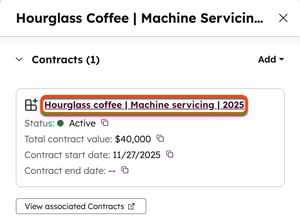
- Contracts can also be viewed on the contract index page.
Next steps
- Learn more about the Connected CPQ, Billing, and Payments beta.
- Learn more about creating change and renewal quote templates.
-
Learn more about viewing and managing contracts, including how to edit and renew quotes, terminate, delete, and export contracts, and associate contracts with other records.
