Last updated: January 13, 2026
Available with any of the following subscriptions, except where noted:
-
 Marketing Hub
Professional, Enterprise
Marketing Hub
Professional, Enterprise
-
 Sales Hub
Professional, Enterprise
Sales Hub
Professional, Enterprise
-
 Service Hub
Professional, Enterprise
Service Hub
Professional, Enterprise
-
 Data Hub
Professional, Enterprise
Data Hub
Professional, Enterprise
-
 Content Hub
Professional, Enterprise
Content Hub
Professional, Enterprise
-
 Smart CRM
Professional, Enterprise
Smart CRM
Professional, Enterprise
-
 Commerce Hub
Professional, Enterprise
Commerce Hub
Professional, Enterprise
If your external site is using a login feature or if you require member registration to access private HubSpot-hosted pages, blog posts, or knowledge base content, you can identify logged in visitors in the conversations inbox or the help desk workspace. While chatting with the visitor in the inbox, you'll then have access to known information about them, such as their name or email address. You can use this information to personalize your message content.
Set up visitor identification
Subscription required A Service Hub or Content Hub Professional or Enterprise subscription is required to use the member registration feature in HubSpot.
Subscription required A Professional or Enterprise account is required to set up the Visitor Identification API.
If you're using a login feature on your externally hosted website, you will need to work with a developer on your team to set up the Visitor Identification API to send information to HubSpot. Learn more about the visitor identification API in HubSpot's developer documentation.
If you're using the member registration feature on your HubSpot-hosted pages, blog posts, or knowledge base articles, the chat widget will automatically recognize the visitor if they have already signed in.
View logged in visitors in the inbox
When responding to a message sent from a logged-in visitor in the inbox or help desk, you'll see their contact details in the right sidebar. You can use the information from their record to respond with a personalized message. Any previous messages will also appear so you have a complete record of the contact's past conversations with your team.
Learn more about responding to messages in the conversations inbox or the help desk workspace.
Target logged in visitors
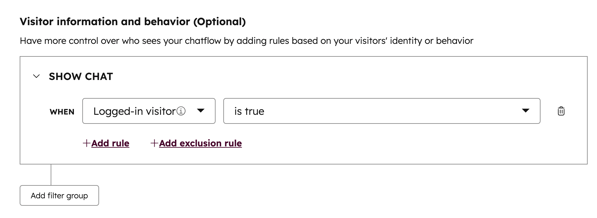
You can also use this feature to target a chatflow that will only display to logged in visitors. Learn more about setting up targeting rules for your chatflow.