
Last updated: October 28, 2026
Available with any of the following subscriptions, except where noted:

When creating a contract, payment link, quote, legacy quote, or subscription for your buyers, set a recurring line item's billing start date to the future. This enables you to collect on confirmed future subscription payments. Learn more about the different ways to bill buyers in HubSpot.
This article explains how to schedule recurring payments for your buyers. For help with your own HubSpot subscription, learn how to manage your subscription.
For example, you can:
- Collect an initial payment for building a website while also scheduling monthly billing for SEO services starting six months in the future.
- Collect an initial payment for an installation while also scheduling monthly maintenance billing starting one month in the future.
- Sign a customer up for a quarterly subscription service two months in advance without billing them until their subscription starts.
Below, learn how to configure a recurring line item to start billing on a future date.
Before you get started
Understand limitations and considerations
Accepted quotes can create contracts whether the billing setting is turned on or not. If the setting is off and recurring line items are part of the quote, a subscription record is created and payment collection remains tied to the existing quote or standalone invoice experience. If the setting is on and recurring line items are part of the quote , a subscription record is created automatically, with billing managed through the contract.
In addition to creating subscriptions from recurring line items on quotes, you can also:
- Directly create contracts (BETA) with recurring line items.
-
Create subscriptions manually.
- Create payment links or legacy quotes with recurring line items, which will automatically create subscriptions.
Learn more about the quote to payment process.
Setting a recurring line item's billing start date for contracts, payment links, and quotes
Subscription required A Revenue Hub subscription is required to create quotes. Legacy quotes access depends on your subscription.
Seats required A Revenue Hub seat is required to create and edit quotes. Legacy quotes access depends on your subscription.
Subscription required A Revenue Hub subscription is required to use contracts unless you're enrolled in the Direct Create, Edit, and Renew HubSpot Contracts beta.
Seats required A Revenue Hub seat is required to use contracts unless you're enrolled in the Direct Create, Edit, and Renew HubSpot Contracts beta.
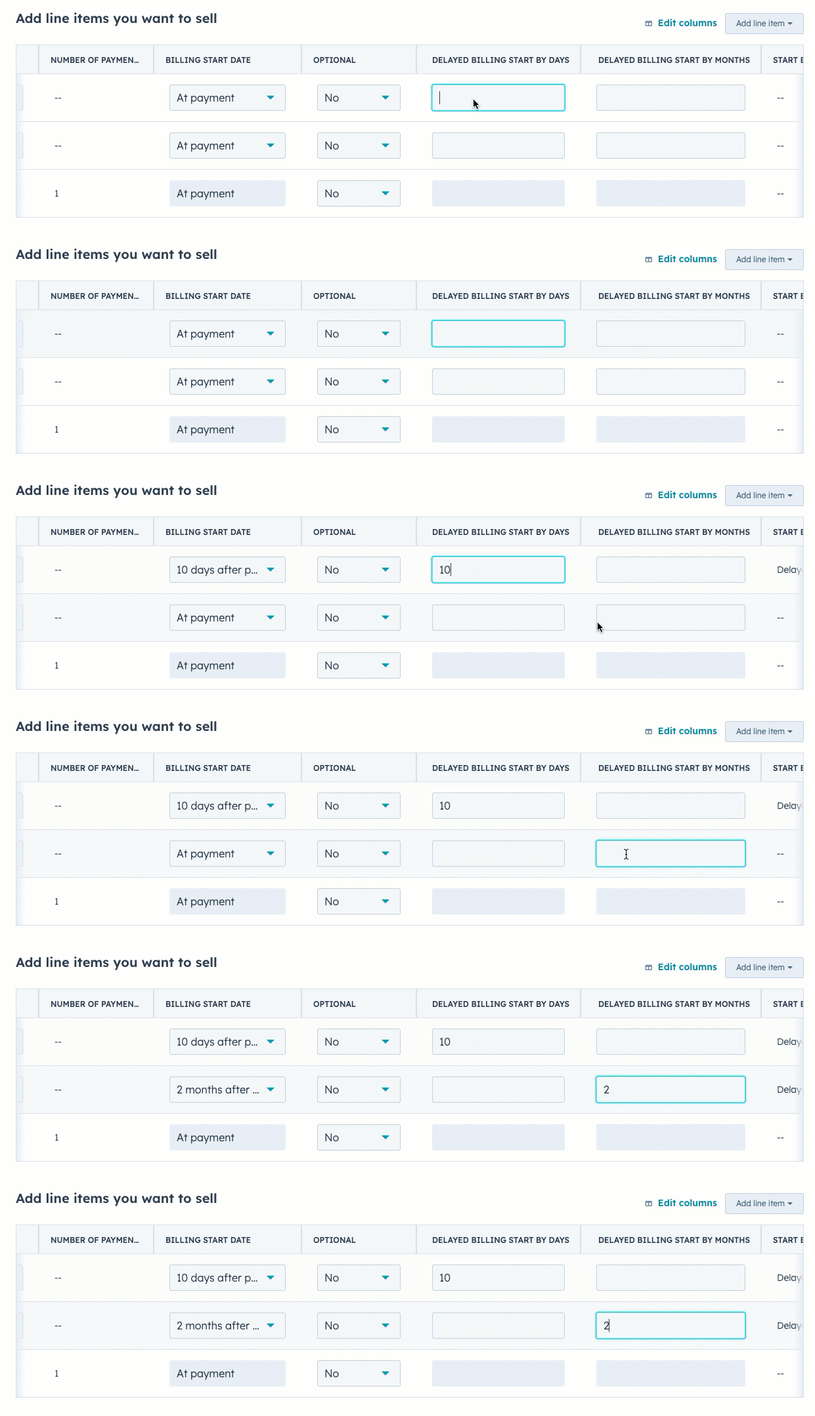
When setting up line items for your contract, payment link, quote, or legacy quote, set the line item billing start date by adjusting the Billing start date or Delayed billing start by days and Delayed billing start by months columns in the line item editor.
To set the billing start date:
- Create a contract, payment link, quote, or legacy quote.
- When adding your line items, to set a future billing start date from the line item table:
-
- In the Billing Frequency column, click the dropdown menu and select the frequency.
- In the Billing Start Date column, click the dropdown menu and then select one of the following options:
- Custom Date: a specific date in the future. After selecting this option, in the right panel, under Billing start date click the date picker, select the start date, then click Save.
- Delayed start (days): delay the billing start date by a number of days after checkout. After selecting this option, in the right panel, in the Delayed billing start by days field, enter the number of days.
- Delayed start (months): delay the billing start date by a number of months after checkout. After selecting this option, in the right panel, in the Delayed billing start by months field, enter the number of months.

-
- You can also enter a number in the Delayed billing start by days and Delayed billing start by months columns. If you can't see the columns, learn how to add or remove columns.
Please note: this configuration allows you to collect on confirmed future payments from your buyers. You should consult your own legal advisors if you plan on using this tool to collect on other payment options.
- Continue setting up the contract, payment link, quote, or legacy quote.
Setting a recurring line item's billing start date for subscriptions
While setting up line items for your subscription, you can adjust its billing start date by updating the Billing start date column.
- Create a subscription.
- When adding your line items, click the Billing frequency dropdown menu and select the frequency.
- To delay billing until a specific date, in the Billing start date column, click the date picker and select a start date.
Please note: this configuration allows you to collect on confirmed future payments from your buyers. You should consult your own legal advisors if you plan on using this tool to collect on other payment options.
- Continue setting up the subscription.
Viewing payments links or quotes before the start date
In this example, a machine installation has been charged up front, with a recurring maintenance fee billed for a future date. With the future start date selected for the maintenance fee, buyers who view the payment link or quote before that start date will see a Future Payments Summary section with details about the recurring subscription item, in addition to the one-off, up front fee.
This information will also be included in their receipt and your merchant copy. The Total at checkout will only include the initial payment, not any future charges.
Invoices will be sent on each billing date, and will show the total due on that date.

Please note: one-time discounts will only apply to the items due at checkout. This type of discount can't be applied to future-dated recurring line-items. To offer a discount on a future-dated recurring line item, you can instead include a unit discount on the line item.
After checkout, a payment record will be created for the one-time line item, and a subscription record will be created for the recurring line items with a status of Scheduled.
Click View associated payment, then click the payment amount to view details of the payment.
If a buyer opens the payment link or quote after the billing start date has passed, payments for all line items will be due at checkout. Any one-time discounts will then be applied to the first installment of the subscription, rather than just to the one-time line item.
After a buyer checks out, you can manage their subscription, including canceling the subscription, setting up payment reminders, and using subscriptions to power other HubSpot tools.