
Last updated: December 2, 2025
Available with any of the following subscriptions, except where noted:

-
 Seats required for certain features
-
Additional subscriptions required for certain features
Commerce Hub is a suite of tools allowing you to streamline the opportunity-to-revenue process, helping you manage payments from quote to collection in HubSpot. With Commerce Hub, you can create invoices, payment links, and quotes to bill your customers, either for one-time payments or recurring subscriptions. You can customize them further with discounts, fees, and taxes.
Using HubSpot's commerce tools alongside your other CRM data means that you can manage your revenue and customer information all in one place. Incorporate automation and reporting into your commerce tools to automate sales tasks, send post-purchase emails, and report on revenue. If you rely on external systems for your commerce processes, sync with existing accounting tools to keep your data synced across platforms.
Payment processors
To process payments and collect payouts, you can either use HubSpot payments or Stripe as a payment processing option. Both offer equal access to HubSpot’s various commerce tools, so choosing one will depend on a few factors, including fee structure. Learn more about Commerce Hub pricing and payment processing fees.
- HubSpot payments: HubSpot's built-in payment processing option. Users in a Starter, Professional, or Enterprise account can use HubSpot payments. Your business or organization must be located in the United States, the United Kingdom, or Canada. You can collect payments in a range of currencies.
- Stripe: connect an existing Stripe account to use it as a payment processing option for HubSpot’s Commerce Hub tools. Stripe payment processing is available for all HubSpot subscriptions, and is available internationally with some exceptions. You can collect payments in a range of currencies.
Whichever you choose, both one-time and recurring subscription payments are tracked in the CRM like other records. This enables you to use payments in other HubSpot tools, such as using workflows to automate commerce processes or creating custom reports for segmentation and data visualization. Manage your customer data and commerce data in one place, while giving your sales, service, and support teams the context they need.
Ways to collect payments
With a payment processing option set up, you can offer a way for your customers to make purchases using invoices, payment links, and quotes.
- Invoices: move from deal to payment with invoices, sent directly from HubSpot.
- Payment links: collect one-time and recurring payments using links that you can send directly to customers, or embed in web pages, forms, emails, and more.
- Quotes: create branded quotes for one-time and recurring payments. Quotes are part of HubSpot CPQ, and available with a Commerce Hub Professional or Enterprise account. Learn more about HubSpot CPQ.
- Legacy quotes: HubSpot's legacy quotes tool. Learn which accounts have access to legacy quotes.
- Subscriptions: automate subscription management and recurring billing from the CRM. Use subscriptions to automate recurring payments with your customers or send recurring invoices requesting payment.
While the method you choose will depend on your business needs, all support the ability to add discounts, fees, and taxes. Whichever methods you choose, you can collect credit or debit card and bank debit payments, such as ACH, either through HubSpot payments or Stripe payment processing.
Invoices
Create branded invoices in HubSpot directly from quotes and deals, or set up automated recurring invoices via subscriptions, to streamline your invoicing processes. You can configure invoices to be payable through the same checkout process as other commerce tools, or you can manually mark invoices as paid if collecting payments outside of HubSpot. With invoices being tracked alongside your other CRM records, you'll have a full view of your revenue alongside your customer and deal data.
Invoices can be set up with industry-standard net payment terms, as well as customizable payment due dates.
Credit memos
Use credit memos to adjust or reduce the amount owed by a customer for an existing invoice. In HubSpot, you can create, manage, and apply credit memos directly from your invoices, helping you keep your records accurate and your billing organized.
Learn how to create and manage credit memos.
Payment links
Share payment links with your customers for one-time or subscription services. In addition to sharing the link directly with customers, you can embed them on your website, in one-to-one emails, and on meeting scheduling pages. You can also use links in CTAs and collect payments through HubSpot forms.
When a customer uses a payment link, they're brought to a checkout page to review their purchases and enter their credit or debit card, or bank debit information. After purchasing, HubSpot follows up with confirmation emails to both you and the customer, and an invoice is automatically created for the payment.
Quotes
Set up quotes so users can send one-time or recurring branded quotes to prospects and customers. Quotes is part of HubSpot CPQ.
Quotes includes:
- Quote branding templates to offer a branded and standardized experience with your quotes.
- A quote editor to configure pricing, terms, and line items on the quote.
- Acceptance methods: E-signature or accept without signature.
- Quote approvals to create consistent quotes that meet your company's standards.
- A closing agent to allow buyers to ask questions about the quote, and get instant answers.
- Quote engagement tracking, including real-time buyer insights.
- Quote reporting to report on all quotes in your account.
Learn how to:
- Set up quotes
- Set up quote approvals
- Create and send quotes
- Use e-signatures with quotes
- Manage quote approvals
- Manage quotes
Legacy quotes
HubSpot's legacy quotes tool. Non-Commerce Hub Professional or Enterprise accounts created before Sept. 3, 2025 may have access to legacy quotes. Users in a free account have access to legacy quotes if one or more quotes were created in the six months prior to Sept. 3, 2025. Users in a Sales Hub account continue to have access to legacy quotes after Sept. 3, 2025.
Create branded quotes in HubSpot to collect one-time and recurring payments from buyers. One-time quote payments can also be split over time using payment schedules. Include e-signatures for both internal team members and customers, and track the quote's progress through to payment. Upon payment, HubSpot will follow up with confirmation emails to both you and the customer, and an invoice will automatically be created for the payment.
Using HubSpot's free and Sales Hub Starter tools, you can edit the appearance of the default quote templates included with your account by updating their theme settings. With a Sales Hub Professional or Enterprise account, you can create customized quote templates to match your business needs.
Learn how to use legacy quotes.
Subscriptions
If your business sells subscriptions for goods or services, you can configure invoices, payment links, and quotes to bill customers on a recurring basis. For example, charging your customers for memberships or retainers. Billing frequencies can be one-time, weekly, monthly, annually, or on multi-year schedules (every two to five years).
When a customer signs up for a subscription, they're automatically billed based on the specified schedule. Payments can automatically be collected, or invoices can be automatically sent on a due date, and payment collected outside of HubSpot. You can also set subscriptions to start in the future so that your customers can sign up for recurring goods and services ahead of time.
A subscription record will be created in the CRM for each purchased subscription, enabling you to manage subscriptions like other types of CRM records. Like other types of CRM records, you'll be able to take advantage of subscriptions in other HubSpot tools such as workflows and reporting.
- Set up subscriptions
- Create subscriptions
- Edit subscriptions billed in HubSpot
- Manage subscriptions
- Schedule recurring payments to start in the future
Manage payments
Once payments are being collected, users with the appropriate permissions can manage payments in HubSpot.Receiving payouts, review payment records, and manage refunds and receipts.
Payouts are the funds deposited in your bank account from your collected payments each day, minus any fees, refunds, or chargebacks. A daily payout notification email is sent, detailing the payout total. These funds are then deposited to your bank account. If using HubSpot payments, payouts can be viewed in HubSpot. If using Stripe as a payment processing option, payouts are handled by Stripe.
Payment records can be viewed in HubSpot. They include details of each payment including payment date, customer, payment method, payment history, line items, subscriptions, and associated HubSpot records. Refunds and receipts can be managed directly from the payment record, with the option to customize how receipts look to a buyer.
Learn how to manage payments in HubSpot.
Automation
If you have a Professional or Enterprise subscription, you can create workflows to automate commerce-related processes. For example, create a payments-based workflow to:
- Send a welcome email to buyers after a successful payment is made.
- Remind customers to renew their subscriptions, including discount codes for early renewals.
- After a purchase, send an internal email notification to the customer's account manager, then create a ticket to initialize customer onboarding.
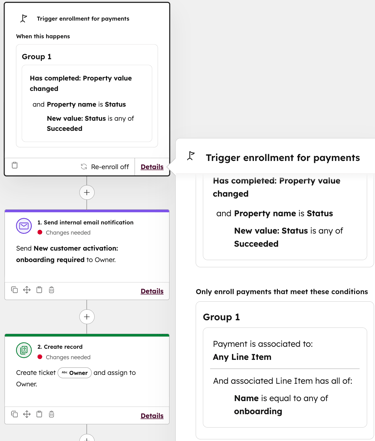
Learn how to use payments in other HubSpot tools.
Integrate other tools
If you use other systems for your business processes, such as accounting tools, connect them to HubSpot. This will keep your data up-to-date across platforms.
Reporting
If you have a Professional or Enterprise subscription, you can view pre-built reports in the commerce analytics suite, or create custom reports to analyze data across your CRM data, including payments.
View and segment records
Each object in HubSpot has an index page where you can see all of the records within that object. On each index page, you can filter records based on the information stored in their property values, and save the filters as a view that you can revisit. For example, you can filter the invoices index page to show all unpaid invoices.
Using the segments tool, you can filter contacts, companies, and deals based on property values as well as additional criteria options. For example, you could build a segment of contacts that have made payments in the last 30 days, to use in other CRM tools like email marketing, or ads.
